

payment_token for processing payouts.
How Does It Work?
Persisting Payment Method Details in a Secure PCI-Compliant Locker
There are two entry points to storing payment methods for a given customer:1. Persisting Payment Methods Prior to Processing Transactions
- Payment methods can be created for a given customer using the
/payment_methodsAPI - This stores the passed payment method details in a secure PCI-compliant locker
2. Persisting Payment Methods Post a Successful Transaction
- If a payment request was created with
"setup_future_usage": "off_session" - Or if a payout request was created with
"recurring": true - The payment method details will be stored in the secure locker once the transaction completes with a successful status
Listing Customer Payment Methods for Processing Payouts
Once the payment methods are stored in the locker, they can be fetched using the customer’s list payment method API. This returns:- Identifiers for the saved payment methods
- A
payment_tokenwhich can be used for processing transactions for a customer
Processing Payouts
Payouts can be created and processed using thepayment_token for a given customer.
Getting Started
We will be using Pesaswap’s hosted dashboard and Postman API collection, working specifically with payout transactions. API Reference: Check the official Pesaswap API documentation Environment URLs:- Backend API endpoint: https://sandbox.pesaswap.io
- Dashboard: https://app.pesaswap.io
Prerequisites
Before you begin, ensure the following:- Processor Configuration: Make sure processors are configured for processing payout transactions
- API Key: Generate an API key by navigating to the Developers section in the dashboard
- Merchant ID: Note down your
merchant_idfrom the dashboard’s home page
Step-by-Step Implementation
Step 1: Import Postman Collection

- Download the Pesaswap Postman collection from the official documentation
- Import the collection into your Postman workspace
- Ensure all endpoints are properly loaded
Step 2: Configure Environment Variables
Navigate to the collection’s Variables tab and set up the following variables: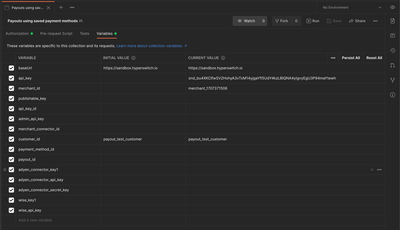
Configuration Steps:
- Open the Postman collection
- Click on the Variables tab
- Enter the values for each required variable
- Save the configuration
Step 3: Execute Use Case #1 - Setting Up Payment Methods
Navigate to the UseCase #1 section in the collection and execute requests in the following order:-
Create Customer
- Establishes a customer record
- Returns a
customer_idfor future reference
-
Create Payment Method
- Stores payment method details securely
- Associates payment method with the customer
-
List Payment Methods
- Retrieves all saved payment methods for the customer
- Obtains
payment_tokenfor future transactions

Step 4: Execute Use Case #2 - Processing Payouts
Navigate to the UseCase #2 section in the collection and execute requests in order:
-
Create Payout Request
- Uses the
payment_tokenfrom Step 3 - Initiates the payout transaction
- Uses the
-
Retrieve Payout Status
- Monitors the payout transaction status
- Confirms successful completion
API Workflow Examples
Creating a Payment Method
Listing Customer Payment Methods
Processing a Payout
Security Considerations
PCI Compliance
- All payment method details are stored in PCI-compliant infrastructure
- Sensitive data is tokenized and encrypted
- Access is controlled through secure API keys
Best Practices
- Token Management: Store
payment_tokenssecurely on your system - API Key Security: Keep API keys confidential and rotate regularly
- Customer Consent: Ensure proper customer consent before storing payment methods
- Data Retention: Follow appropriate data retention policies
Troubleshooting
Common Issues
Invalid Payment Token- Verify the token hasn’t expired
- Ensure the customer ID matches the token
- Check processor configuration
- Verify sufficient account balance
- Confirm payment method is valid for payouts
- Validate API key is correct and active
- Check merchant ID matches your account
- Ensure proper request headers are set
Testing Tips
- Use Sandbox Environment: Always test in sandbox before production
- Test Different Scenarios: Try various payment method types and failure cases
- Monitor Webhooks: Set up webhook endpoints to track transaction status
- Validate Responses: Check all API responses for proper data structure
Next Steps
After successful implementation:- Production Migration: Switch to production endpoints and credentials
- Monitoring Setup: Implement proper logging and monitoring
- Customer Communication: Set up notification systems for payout status
- Compliance Review: Ensure all processes meet regulatory requirements
Support Resources
- Documentation: Official Pesaswap API documentation
- Support: Contact Pesaswap support team for nical assistance
- Community: Join the developer community for best practices and tips