Test the Configuration using Dashboard
- Upon configuration of the Connector, navigate to the dashboard home page.
- Proceed with the “Try a test payment” option on the home page of the dashboard.
- Setup your demo checkout page by providing Business profile, Profile Id, Currency and Amount.
- Click on Show Preview, Your demo checkout page will be visible at preview section.
- Choose the desired payment method in the demo page, Please find the test payment instrument data here.
- Click on Pay and you will get a Success message.
- Validate transaction on Pesaswap dashboard:
- Goto the left pane on the Pesaswap dashboard
- Click on Operations -> Payments
- Your transactions should be visible under the order management tab
Test Credentials
Test Cards for popular connectors
Dummy Connector test cards
Different flows are available for dummy connector transactions, determined by the card number. For dummy connector cards, both the expiration date and CVV can be any future date and three-digit number, respectively. Dummy connectors only support payments and refunds. Payments made with dummy connectors expire after 2 days. Refunds will not be possible for expired payments.Non 3DS flows
3DS flows
Klarna - Direct integration test credentials
Simulate a successful payment with the following credentials:United States
- Phone number: +1310668331
- OTP: 123456 (Random 6-digit different from 999999)
United Kingdom
- Phone number: +4408082580300
- OTP: 123456 (Random 6-digit different from 999999)
Googlepay - Test credentials
In order to test Googlepay, you will have to use your Gmail account and join Google’s test user group. You will land on Google’s page which says “Congratulations! You now have access to our test suite! No further action is required.” Ensure that you are logged in to your Gmail account, hit the Googlepay option. You will automatically get all test cards on your user journey.ApplePay - Test credentials
In order to test ApplePay, you will need to follow these steps written in ApplePay sandbox testing docs. Apple Pay provides test cards from various card companies and supported regions as well. To pay you can use TouchID on the Macbook or your iPhone. These devices should be configured in your apple account.Unable to test Applepay successfully?
- Applepay sandbox testing is supported only if you are located in any of these 15 countries.
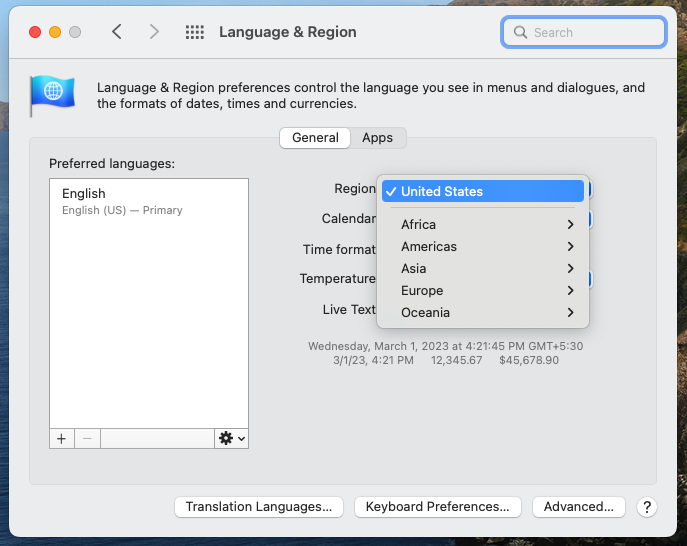
- Your Safari browser automatically detects your location from your System Preferences.
- If you are not located in the supported countries, but still wish to test Applepay, please change your Region using Mac System preferences > Language & Region > choose any of the 15 supported countries.