Key Features of Payment Method Management in Pesaswap
Payment Method Creation:Payment Method Creation: Easily allow your customers to save new payment methods during checkout, providing a convenient option for future transactions.
Storing Payment Methods: Pesaswap securely stores customer payment details, enabling repeat purchases without requiring them to re-enter their information each time.
Retrieving Payment Methods: Customers can quickly access their saved payment methods, streamlining their checkout process and enhancing their overall experience.
Deleting/Deactivating Payment Methods: Keep payment options up to date by allowing customers to manage outdated or inactive methods, ensuring a clean and efficient payment experience.
Currently, Pesaswap supports management of payment methods saved during checkout. Support for adding payment methods outside the purchase journey will be available soon.
Get your API key from Pesaswap dashboard.Add an endpoint on your server that creates an Ephemeral Key. An ephemeral key is a temporary, short-lived key used to securely manage sensitive operations, such as updating or deleting payment methods, without exposing full access credentials. It has a limited validity period and restricted capabilities, ensuring that it can only be used for specific tasks and not for initiating payments. This enhances security by minimizing the risk of unauthorized access and reducing the exposure of sensitive data. Return the secret obtained in the response to setup Payment Methods Management on client.
As of now, Pesaswap only supports management of the payment methods saved during checkout, We will soon roll out the feature enabling you to add a payment method for a non-purchase journey.
Make a request to the endpoint on your server to create a new Ephemeral Key. The ephemeralKey returned by your endpoint is used to fetch all the customer saved payment methods.
Pass the promise from loadHyper to the HyperManagementElements component. This allows the child components to access the Hyper service via the HyperManagementElements parent component. Additionally, pass the ephemeralKey in options to the HyperManagementElements component.
import { loadHyper } from "@Pesaswap-/hyper-js";const hyperPromise = loadHyper("YOUR_PUBLISHABLE_KEY");
2.6 Create Ephemeral Key and Mount Element (JavaScript)
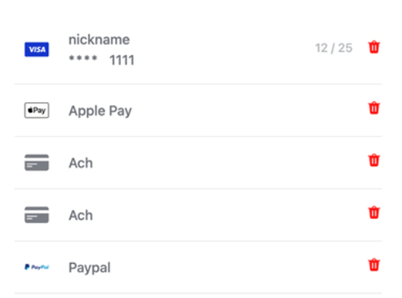
Add the PaymentMethodsManagementElement to your Payment Management Form. This embeds an iframe with a dynamic form that displays saved payment methods, allowing your customer to see all their saved payment methods and delete them.
You have successfully integrated Pesaswap Payment Methods Management into your application.
{"docsConfig":{"theme":"mint","$schema":"https://mintlify.com/docs.json","name":"Pesaswap","description":"The complete digital payments platform for businesses of all sizes. Accept payments, manage transactions, and scale your business with Pesaswap - your best option for handling digital payments seamlessly.","colors":{"primary":"#02555B","light":"#2A7A7F","dark":"#013E42"},"logo":{"light":"https://mintcdn.com/pesaswap/gF_mzxFkI4qLgyPO/logo/light.svg?fit=max\u0026auto=format\u0026n=gF_mzxFkI4qLgyPO\u0026q=85\u0026s=3ab49bf4de03976de57a8f434e021b91","dark":"https://mintcdn.com/pesaswap/gF_mzxFkI4qLgyPO/logo/dark.svg?fit=max\u0026auto=format\u0026n=gF_mzxFkI4qLgyPO\u0026q=85\u0026s=da8704c755b4bdd989f354eafa16683c","href":"https://pesaswap.io"},"favicon":"https://mintcdn.com/pesaswap/9QnEDG_16mHRPjKR/favicon.png?fit=max\u0026auto=format\u0026n=9QnEDG_16mHRPjKR\u0026q=85\u0026s=d0c620d74c2cf12df449218d52c6b24d","api":{"openapi":["openapi_spec.json"],"playground":{"display":"simple"},"examples":{"languages":["curl","javascript","python","php"]},"mdx":{"auth":{"method":"bearer"},"server":"https://api.pesaswap.io"}},"background":{"decoration":"grid","color":{"light":"#F5FFFE","dark":"#1A2E2F"}},"navbar":{"links":[{"href":"mailto:support@pesaswap.com","label":"Support"}],"primary":{"type":"button","label":"Dashboard","href":"https://app.pesaswap.io"}},"search":{"prompt":"Search Pesaswap documentation..."},"fonts":{"heading":{"family":"Inter","weight":400},"body":{"family":"Inter","weight":400}},"icons":{"library":"lucide"},"styling":{"codeblocks":"system","latex":false},"navigation":{"pages":[]}},"deployment":{"deploymentMetadataValue":{"subdomain":"pesaswap","hasAudioNarration":false,"actualSubdomain":"pesaswap","customDomains":["docs.pesaswap.io"],"gitSource":{"type":"github","owner":"pesaswap","repo":"pesaswap-api","deployBranch":"mpesa","contentDirectory":"api-reference","isPrivate":true,"mountPath":"","label":""},"chroma":{"liveDeploymentHistoryId":"6ace510299d09ae5ef400572","collectionId":"1916047d-19bd-4e00-a2d8-5b016a915ce8","schemaVersion":"v3","latestBuiltDeploymentHistoryId":"6ace510299d09ae5ef400572"},"entitlements":{},"buildId":"6ace510299d09ae5ef400572","clientVersion":"0.0.3869","searchFilterCounts":[{"language":"default","tag":"Explore","count":75},{"language":"default","tag":"API Reference","count":57},{"language":"default","tag":"Explore Pesaswap","count":49},{"language":"default","tag":"Operations","count":35},{"language":"default","tag":"Checkout Experience","count":19},{"language":"default","tag":"Customizable and Native Integrations","count":17},{"language":"default","tag":"Payment Orchestration","count":17},{"language":"default","tag":"Admin APIs","count":13},{"language":"default","tag":"Payments","count":11},{"language":"default","tag":"Payouts","count":10}]},"assistantConfig":{},"hasChatPermissions":false,"hasWebMcpPermissions":false,"toggles":[{"name":"kill-isr","enabled":true,"variant":{"name":"disabled","enabled":false,"feature_enabled":true},"impressionData":false},{"name":"agent-mintlify-slack","enabled":true,"variant":{"name":"disabled","enabled":false,"feature_enabled":true},"impressionData":false},{"name":"editor-v7-file-tree","enabled":true,"variant":{"name":"disabled","enabled":false,"feature_enabled":true},"impressionData":false},{"name":"agent-integrations-settings","enabled":true,"variant":{"name":"disabled","enabled":false,"feature_enabled":true},"impressionData":false},{"name":"automations-pr-grouping","enabled":true,"variant":{"name":"disabled","enabled":false,"feature_enabled":true},"impressionData":false},{"name":"custom-prefix","enabled":true,"variant":{"name":"disabled","enabled":false,"feature_enabled":true},"impressionData":false},{"name":"analytics-v7","enabled":true,"variant":{"name":"disabled","enabled":false,"feature_enabled":true},"impressionData":false},{"name":"user-flows-analytics","enabled":true,"variant":{"name":"disabled","enabled":false,"feature_enabled":true},"impressionData":false},{"name":"no-publish-flow","enabled":true,"variant":{"name":"disabled","enabled":false,"feature_enabled":true},"impressionData":false},{"name":"llms-txt-v2","enabled":true,"variant":{"name":"disabled","enabled":false,"feature_enabled":true},"impressionData":false},{"name":"pause-universal-search-reconcile","enabled":true,"variant":{"name":"disabled","enabled":false,"feature_enabled":true},"impressionData":false},{"name":"snapshot-serving-live","enabled":true,"variant":{"name":"disabled","enabled":false,"feature_enabled":true},"impressionData":false},{"name":"stripTemperatureMiddleware","enabled":true,"variant":{"name":"disabled","enabled":false,"feature_enabled":true},"impressionData":false},{"name":"per-site-search-delta","enabled":true,"variant":{"name":"disabled","enabled":false,"feature_enabled":true},"impressionData":false},{"name":"support-platform-pylon-zendesk","enabled":true,"variant":{"name":"disabled","enabled":false,"feature_enabled":true},"impressionData":false},{"name":"editor-branches-v2-autocommit","enabled":true,"variant":{"name":"disabled","enabled":false,"feature_enabled":true},"impressionData":false},{"name":"editor-branches-v2","enabled":true,"variant":{"name":"disabled","enabled":false,"feature_enabled":true},"impressionData":false},{"name":"snapshot-serving","enabled":true,"variant":{"name":"disabled","enabled":false,"feature_enabled":true},"impressionData":false},{"name":"instant-rollback","enabled":true,"variant":{"name":"disabled","enabled":false,"feature_enabled":true},"impressionData":false},{"name":"granular-notifications-server","enabled":true,"variant":{"name":"disabled","enabled":false,"feature_enabled":true},"impressionData":false},{"name":"granular-notifications","enabled":true,"variant":{"name":"disabled","enabled":false,"feature_enabled":true},"impressionData":false},{"name":"editor-private-page-search","enabled":true,"variant":{"name":"disabled","enabled":false,"feature_enabled":true},"impressionData":false},{"name":"automations-fable","enabled":true,"variant":{"name":"disabled","enabled":false,"feature_enabled":true},"impressionData":false},{"name":"fixed-ai-action-pricing","enabled":true,"variant":{"name":"disabled","enabled":false,"feature_enabled":true},"impressionData":false},{"name":"automation-resolve-merge-conflict","enabled":true,"variant":{"name":"disabled","enabled":false,"feature_enabled":true},"impressionData":false},{"name":"scoped-publishing","enabled":true,"variant":{"name":"disabled","enabled":false,"feature_enabled":true},"impressionData":false},{"name":"mintql","enabled":true,"variant":{"name":"disabled","enabled":false,"feature_enabled":true},"impressionData":false},{"name":"page-level-analytics","enabled":true,"variant":{"name":"disabled","enabled":false,"feature_enabled":true},"impressionData":false},{"name":"teamspace","enabled":true,"variant":{"name":"disabled","enabled":false,"feature_enabled":true},"impressionData":false},{"name":"editor-version-history-v2","enabled":true,"variant":{"name":"disabled","enabled":false,"feature_enabled":true},"impressionData":false},{"name":"vite-origin","enabled":true,"variant":{"name":"disabled","enabled":false,"feature_enabled":true},"impressionData":false},{"name":"editor-nav-generations","enabled":true,"variant":{"name":"disabled","enabled":false,"feature_enabled":true},"impressionData":false},{"name":"workspace-projects","enabled":true,"variant":{"name":"disabled","enabled":false,"feature_enabled":true},"impressionData":false},{"name":"assistant-v5","enabled":true,"variant":{"name":"disabled","enabled":false,"feature_enabled":true},"impressionData":false},{"name":"byok-sep-25","enabled":true,"variant":{"name":"disabled","enabled":false,"feature_enabled":true},"impressionData":false},{"name":"revalidation-jwt","enabled":true,"variant":{"name":"disabled","enabled":false,"feature_enabled":true},"impressionData":false},{"name":"editor-agent-model-picker","enabled":true,"variant":{"name":"disabled","enabled":false,"feature_enabled":true},"impressionData":false},{"name":"client-snapshot-docs-config","enabled":true,"variant":{"name":"disabled","enabled":false,"feature_enabled":true},"impressionData":false},{"name":"hobby-abuse-scan","enabled":true,"variant":{"name":"disabled","enabled":false,"feature_enabled":true},"impressionData":false}],"isAtlas":false,"googleFontsInlined":false},"customCss":[{"filePath":"public/css/custom.css","content":""}],"page":{"pagePath":"essentials/explore-pesaswap/checkout-experience/payment-method-management","slug":"/essentials/explore-pesaswap/checkout-experience/payment-method-management","pageMetadata":{"title":"Payment Method Management","icon":"square-kanban","description":null,"href":"/essentials/explore-pesaswap/checkout-experience/payment-method-management"},"pageType":"default","mdx":{"mdxSource":{"compiledSource":"\"use strict\";const{Fragment:_Fragment,jsx:_jsx,jsxs:_jsxs}=arguments[0];const{useMDXComponents:_provideComponents}=arguments[0];function _createMdxContent(props){const _components={code:`code`,li:`li`,ol:`ol`,p:`p`,pre:`pre`,span:`span`,strong:`strong`,..._provideComponents(),...props.components},{CodeBlock,Heading,Info,OptimizedImage}=_components;if(!CodeBlock)_missingMdxReference(`CodeBlock`,true);if(!Heading)_missingMdxReference(`Heading`,true);if(!Info)_missingMdxReference(`Info`,true);if(!OptimizedImage)_missingMdxReference(`OptimizedImage`,true);return _jsxs(_Fragment,{children:[_jsx(_components.p,{children:`Pesaswap is designed to facilitate the management of saved payment methods.`}),`\n`,_jsx(Info,{children:`This section guides you through the Pesaswap Payment Methods Management and how to integrate it.`}),`\n`,_jsx(Heading,{level:`2`,id:`key-features-of-payment-method-management-in-pesaswap`,children:`Key Features of Payment Method Management in Pesaswap`}),`\n`,_jsxs(_components.ol,{children:[`\n`,_jsxs(_components.li,{children:[_jsx(_components.strong,{children:`Payment Method Creation`}),`:Payment Method Creation: Easily allow your customers to save new payment methods during checkout, providing a convenient option for future transactions.`]}),`\n`,_jsxs(_components.li,{children:[_jsx(_components.strong,{children:`Storing Payment Methods`}),`: Pesaswap securely stores customer payment details, enabling repeat purchases without requiring them to re-enter their information each time.`]}),`\n`,_jsxs(_components.li,{children:[_jsx(_components.strong,{children:`Retrieving Payment Methods`}),`: Customers can quickly access their saved payment methods, streamlining their checkout process and enhancing their overall experience.`]}),`\n`,_jsxs(_components.li,{children:[_jsx(_components.strong,{children:`Deleting/Deactivating Payment Methods`}),`: Keep payment options up to date by allowing customers to manage outdated or inactive methods, ensuring a clean and efficient payment experience.`]}),`\n`]}),`\n`,_jsx(OptimizedImage,{src:`https://imgstorepesaswap.blob.core.windows.net/images/paymentmethod.png`}),`\n`,_jsx(Info,{children:`Currently, Pesaswap supports management of payment methods saved during checkout. Support for adding payment methods outside the purchase journey will be available soon.`}),`\n`,_jsx(Heading,{level:`2`,id:`1-setup-the-server`,children:`1. Setup the Server`}),`\n`,_jsx(Heading,{level:`3`,id:`1-1-create-an-ephemeral-key`,children:`1.1 Create an Ephemeral Key`}),`\n`,_jsx(_components.p,{children:`Get your API key from Pesaswap dashboard.`}),`\n`,_jsx(_components.p,{children:`Add an endpoint on your server that creates an Ephemeral Key. An ephemeral key is a temporary, short-lived key used to securely manage sensitive operations, such as updating or deleting payment methods, without exposing full access credentials. It has a limited validity period and restricted capabilities, ensuring that it can only be used for specific tasks and not for initiating payments. This enhances security by minimizing the risk of unauthorized access and reducing the exposure of sensitive data. Return the secret obtained in the response to setup Payment Methods Management on client.`}),`\n`,_jsx(CodeBlock,{filename:``,numberOfLines:`26`,language:`javascript`,children:_jsx(_components.pre,{className:`shiki shiki-themes github-light-default dark-plus`,style:{backgroundColor:`#ffffff`,\"--shiki-dark-bg\":`#0B0C0E`,color:`#1f2328`,\"--shiki-dark\":`#D4D4D4`},language:`javascript`,children:_jsxs(_components.code,{language:`javascript`,numberOfLines:`26`,children:[_jsxs(_components.span,{className:`line`,children:[_jsx(_components.span,{style:{color:`#CF222E`,\"--shiki-dark\":`#569CD6`},children:`const`}),_jsx(_components.span,{style:{color:`#0550AE`,\"--shiki-dark\":`#4FC1FF`},children:` app`}),_jsx(_components.span,{style:{color:`#CF222E`,\"--shiki-dark\":`#D4D4D4`},children:` =`}),_jsx(_components.span,{style:{color:`#8250DF`,\"--shiki-dark\":`#DCDCAA`},children:` express`}),_jsx(_components.span,{style:{color:`#1F2328`,\"--shiki-dark\":`#D4D4D4`},children:`();`})]}),`\n`,_jsx(_components.span,{className:`line`}),`\n`,_jsxs(_components.span,{className:`line`,children:[_jsx(_components.span,{style:{color:`#1F2328`,\"--shiki-dark\":`#9CDCFE`},children:`app`}),_jsx(_components.span,{style:{color:`#1F2328`,\"--shiki-dark\":`#D4D4D4`},children:`.`}),_jsx(_components.span,{style:{color:`#8250DF`,\"--shiki-dark\":`#DCDCAA`},children:`post`}),_jsx(_components.span,{style:{color:`#1F2328`,\"--shiki-dark\":`#D4D4D4`},children:`(`}),_jsx(_components.span,{style:{color:`#0A3069`,\"--shiki-dark\":`#CE9178`},children:`\"/create-ephemeral-key\"`}),_jsx(_components.span,{style:{color:`#1F2328`,\"--shiki-dark\":`#D4D4D4`},children:`, `}),_jsx(_components.span,{style:{color:`#CF222E`,\"--shiki-dark\":`#569CD6`},children:`async`}),_jsx(_components.span,{style:{color:`#1F2328`,\"--shiki-dark\":`#D4D4D4`},children:` (`}),_jsx(_components.span,{style:{color:`#953800`,\"--shiki-dark\":`#9CDCFE`},children:`req`}),_jsx(_components.span,{style:{color:`#1F2328`,\"--shiki-dark\":`#D4D4D4`},children:`, `}),_jsx(_components.span,{style:{color:`#953800`,\"--shiki-dark\":`#9CDCFE`},children:`res`}),_jsx(_components.span,{style:{color:`#1F2328`,\"--shiki-dark\":`#D4D4D4`},children:`) `}),_jsx(_components.span,{style:{color:`#CF222E`,\"--shiki-dark\":`#569CD6`},children:`=>`}),_jsx(_components.span,{style:{color:`#1F2328`,\"--shiki-dark\":`#D4D4D4`},children:` {`})]}),`\n`,_jsxs(_components.span,{className:`line`,children:[_jsx(_components.span,{style:{color:`#CF222E`,\"--shiki-dark\":`#C586C0`},children:` try`}),_jsx(_components.span,{style:{color:`#1F2328`,\"--shiki-dark\":`#D4D4D4`},children:` {`})]}),`\n`,_jsxs(_components.span,{className:`line`,children:[_jsx(_components.span,{style:{color:`#CF222E`,\"--shiki-dark\":`#569CD6`},children:` const`}),_jsx(_components.span,{style:{color:`#0550AE`,\"--shiki-dark\":`#4FC1FF`},children:` response`}),_jsx(_components.span,{style:{color:`#CF222E`,\"--shiki-dark\":`#D4D4D4`},children:` =`}),_jsx(_components.span,{style:{color:`#CF222E`,\"--shiki-dark\":`#C586C0`},children:` await`}),_jsx(_components.span,{style:{color:`#8250DF`,\"--shiki-dark\":`#DCDCAA`},children:` fetch`}),_jsx(_components.span,{style:{color:`#1F2328`,\"--shiki-dark\":`#D4D4D4`},children:`(`}),_jsx(_components.span,{style:{color:`#0A3069`,\"--shiki-dark\":`#CE9178`},children:\"`https://sandbox.pesaswap.io/ephemeral_keys`\"}),_jsx(_components.span,{style:{color:`#1F2328`,\"--shiki-dark\":`#D4D4D4`},children:`, {`})]}),`\n`,_jsxs(_components.span,{className:`line`,children:[_jsx(_components.span,{style:{color:`#1F2328`,\"--shiki-dark\":`#9CDCFE`},children:` method:`}),_jsx(_components.span,{style:{color:`#0A3069`,\"--shiki-dark\":`#CE9178`},children:` \"POST\"`}),_jsx(_components.span,{style:{color:`#1F2328`,\"--shiki-dark\":`#D4D4D4`},children:`,`})]}),`\n`,_jsxs(_components.span,{className:`line`,children:[_jsx(_components.span,{style:{color:`#1F2328`,\"--shiki-dark\":`#9CDCFE`},children:` headers:`}),_jsx(_components.span,{style:{color:`#1F2328`,\"--shiki-dark\":`#D4D4D4`},children:` {`})]}),`\n`,_jsxs(_components.span,{className:`line`,children:[_jsx(_components.span,{style:{color:`#0A3069`,\"--shiki-dark\":`#CE9178`},children:` \"Content-Type\"`}),_jsx(_components.span,{style:{color:`#1F2328`,\"--shiki-dark\":`#9CDCFE`},children:`:`}),_jsx(_components.span,{style:{color:`#0A3069`,\"--shiki-dark\":`#CE9178`},children:` \"application/json\"`}),_jsx(_components.span,{style:{color:`#1F2328`,\"--shiki-dark\":`#D4D4D4`},children:`,`})]}),`\n`,_jsxs(_components.span,{className:`line`,children:[_jsx(_components.span,{style:{color:`#0A3069`,\"--shiki-dark\":`#CE9178`},children:` \"api-key\"`}),_jsx(_components.span,{style:{color:`#1F2328`,\"--shiki-dark\":`#9CDCFE`},children:`:`}),_jsx(_components.span,{style:{color:`#0A3069`,\"--shiki-dark\":`#CE9178`},children:` \"YOUR_API_KEY\"`})]}),`\n`,_jsx(_components.span,{className:`line`,children:_jsx(_components.span,{style:{color:`#1F2328`,\"--shiki-dark\":`#D4D4D4`},children:` },`})}),`\n`,_jsxs(_components.span,{className:`line`,children:[_jsx(_components.span,{style:{color:`#1F2328`,\"--shiki-dark\":`#9CDCFE`},children:` body:`}),_jsx(_components.span,{style:{color:`#0550AE`,\"--shiki-dark\":`#4FC1FF`},children:` JSON`}),_jsx(_components.span,{style:{color:`#1F2328`,\"--shiki-dark\":`#D4D4D4`},children:`.`}),_jsx(_components.span,{style:{color:`#8250DF`,\"--shiki-dark\":`#DCDCAA`},children:`stringify`}),_jsx(_components.span,{style:{color:`#1F2328`,\"--shiki-dark\":`#D4D4D4`},children:`(`}),_jsx(_components.span,{style:{color:`#1F2328`,\"--shiki-dark\":`#9CDCFE`},children:`req`}),_jsx(_components.span,{style:{color:`#1F2328`,\"--shiki-dark\":`#D4D4D4`},children:`.`}),_jsx(_components.span,{style:{color:`#1F2328`,\"--shiki-dark\":`#9CDCFE`},children:`body`}),_jsx(_components.span,{style:{color:`#1F2328`,\"--shiki-dark\":`#D4D4D4`},children:`),`})]}),`\n`,_jsx(_components.span,{className:`line`,children:_jsx(_components.span,{style:{color:`#1F2328`,\"--shiki-dark\":`#D4D4D4`},children:` });`})}),`\n`,_jsx(_components.span,{className:`line`}),`\n`,_jsxs(_components.span,{className:`line`,children:[_jsx(_components.span,{style:{color:`#CF222E`,\"--shiki-dark\":`#569CD6`},children:` const`}),_jsx(_components.span,{style:{color:`#0550AE`,\"--shiki-dark\":`#4FC1FF`},children:` ephemeralKey`}),_jsx(_components.span,{style:{color:`#CF222E`,\"--shiki-dark\":`#D4D4D4`},children:` =`}),_jsx(_components.span,{style:{color:`#CF222E`,\"--shiki-dark\":`#C586C0`},children:` await`}),_jsx(_components.span,{style:{color:`#1F2328`,\"--shiki-dark\":`#9CDCFE`},children:` response`}),_jsx(_components.span,{style:{color:`#1F2328`,\"--shiki-dark\":`#D4D4D4`},children:`.`}),_jsx(_components.span,{style:{color:`#8250DF`,\"--shiki-dark\":`#DCDCAA`},children:`json`}),_jsx(_components.span,{style:{color:`#1F2328`,\"--shiki-dark\":`#D4D4D4`},children:`();`})]}),`\n`,_jsx(_components.span,{className:`line`}),`\n`,_jsxs(_components.span,{className:`line`,children:[_jsx(_components.span,{style:{color:`#1F2328`,\"--shiki-dark\":`#9CDCFE`},children:` res`}),_jsx(_components.span,{style:{color:`#1F2328`,\"--shiki-dark\":`#D4D4D4`},children:`.`}),_jsx(_components.span,{style:{color:`#8250DF`,\"--shiki-dark\":`#DCDCAA`},children:`send`}),_jsx(_components.span,{style:{color:`#1F2328`,\"--shiki-dark\":`#D4D4D4`},children:`({`})]}),`\n`,_jsxs(_components.span,{className:`line`,children:[_jsx(_components.span,{style:{color:`#1F2328`,\"--shiki-dark\":`#9CDCFE`},children:` ephemeralKey:`}),_jsx(_components.span,{style:{color:`#1F2328`,\"--shiki-dark\":`#9CDCFE`},children:` ephemeralKey`}),_jsx(_components.span,{style:{color:`#1F2328`,\"--shiki-dark\":`#D4D4D4`},children:`.`}),_jsx(_components.span,{style:{color:`#1F2328`,\"--shiki-dark\":`#9CDCFE`},children:`secret`}),_jsx(_components.span,{style:{color:`#1F2328`,\"--shiki-dark\":`#D4D4D4`},children:`,`})]}),`\n`,_jsx(_components.span,{className:`line`,children:_jsx(_components.span,{style:{color:`#1F2328`,\"--shiki-dark\":`#D4D4D4`},children:` });`})}),`\n`,_jsxs(_components.span,{className:`line`,children:[_jsx(_components.span,{style:{color:`#1F2328`,\"--shiki-dark\":`#D4D4D4`},children:` } `}),_jsx(_components.span,{style:{color:`#CF222E`,\"--shiki-dark\":`#C586C0`},children:`catch`}),_jsx(_components.span,{style:{color:`#1F2328`,\"--shiki-dark\":`#D4D4D4`},children:` (`}),_jsx(_components.span,{style:{color:`#1F2328`,\"--shiki-dark\":`#9CDCFE`},children:`err`}),_jsx(_components.span,{style:{color:`#1F2328`,\"--shiki-dark\":`#D4D4D4`},children:`) {`})]}),`\n`,_jsxs(_components.span,{className:`line`,children:[_jsx(_components.span,{style:{color:`#1F2328`,\"--shiki-dark\":`#9CDCFE`},children:` res`}),_jsx(_components.span,{style:{color:`#1F2328`,\"--shiki-dark\":`#D4D4D4`},children:`.`}),_jsx(_components.span,{style:{color:`#8250DF`,\"--shiki-dark\":`#DCDCAA`},children:`status`}),_jsx(_components.span,{style:{color:`#1F2328`,\"--shiki-dark\":`#D4D4D4`},children:`(`}),_jsx(_components.span,{style:{color:`#0550AE`,\"--shiki-dark\":`#B5CEA8`},children:`400`}),_jsx(_components.span,{style:{color:`#1F2328`,\"--shiki-dark\":`#D4D4D4`},children:`).`}),_jsx(_components.span,{style:{color:`#8250DF`,\"--shiki-dark\":`#DCDCAA`},children:`send`}),_jsx(_components.span,{style:{color:`#1F2328`,\"--shiki-dark\":`#D4D4D4`},children:`({`})]}),`\n`,_jsxs(_components.span,{className:`line`,children:[_jsx(_components.span,{style:{color:`#1F2328`,\"--shiki-dark\":`#9CDCFE`},children:` error:`}),_jsx(_components.span,{style:{color:`#1F2328`,\"--shiki-dark\":`#D4D4D4`},children:` {`})]}),`\n`,_jsxs(_components.span,{className:`line`,children:[_jsx(_components.span,{style:{color:`#1F2328`,\"--shiki-dark\":`#9CDCFE`},children:` message:`}),_jsx(_components.span,{style:{color:`#1F2328`,\"--shiki-dark\":`#9CDCFE`},children:` err`}),_jsx(_components.span,{style:{color:`#1F2328`,\"--shiki-dark\":`#D4D4D4`},children:`.`}),_jsx(_components.span,{style:{color:`#1F2328`,\"--shiki-dark\":`#9CDCFE`},children:`message`}),_jsx(_components.span,{style:{color:`#1F2328`,\"--shiki-dark\":`#D4D4D4`},children:`,`})]}),`\n`,_jsx(_components.span,{className:`line`,children:_jsx(_components.span,{style:{color:`#1F2328`,\"--shiki-dark\":`#D4D4D4`},children:` },`})}),`\n`,_jsx(_components.span,{className:`line`,children:_jsx(_components.span,{style:{color:`#1F2328`,\"--shiki-dark\":`#D4D4D4`},children:` });`})}),`\n`,_jsx(_components.span,{className:`line`,children:_jsx(_components.span,{style:{color:`#1F2328`,\"--shiki-dark\":`#D4D4D4`},children:` }`})}),`\n`,_jsx(_components.span,{className:`line`,children:_jsx(_components.span,{style:{color:`#1F2328`,\"--shiki-dark\":`#D4D4D4`},children:`});`})}),`\n`]})})}),`\n`,_jsx(_components.p,{children:`As of now, Pesaswap only supports management of the payment methods saved during checkout, We will soon roll out the feature enabling you to add a payment method for a non-purchase journey.`}),`\n`,_jsx(Heading,{level:`2`,id:`2-build-payment-management-page-on-the-client`,children:`2. Build Payment Management Page on the Client`}),`\n`,_jsx(Heading,{level:`3`,id:`2-1-install-the-hyper-js-and-react-hyper-js-libraries`,children:`2.1 Install the hyper-js and react-hyper-js libraries`}),`\n`,_jsx(_components.p,{children:`Install the packages and import it into your code`}),`\n`,_jsx(_components.p,{children:_jsx(_components.strong,{children:`React`})}),`\n`,_jsx(CodeBlock,{filename:``,numberOfLines:`2`,language:`shellscript`,children:_jsx(_components.pre,{className:`shiki shiki-themes github-light-default dark-plus`,style:{backgroundColor:`#ffffff`,\"--shiki-dark-bg\":`#0B0C0E`,color:`#1f2328`,\"--shiki-dark\":`#D4D4D4`},language:`shellscript`,children:_jsxs(_components.code,{language:`shellscript`,numberOfLines:`2`,children:[_jsxs(_components.span,{className:`line`,children:[_jsx(_components.span,{style:{color:`#953800`,\"--shiki-dark\":`#DCDCAA`},children:`npm`}),_jsx(_components.span,{style:{color:`#0A3069`,\"--shiki-dark\":`#CE9178`},children:` install`}),_jsx(_components.span,{style:{color:`#0A3069`,\"--shiki-dark\":`#CE9178`},children:` @Pesaswap-/hyper-js`})]}),`\n`,_jsxs(_components.span,{className:`line`,children:[_jsx(_components.span,{style:{color:`#953800`,\"--shiki-dark\":`#DCDCAA`},children:`npm`}),_jsx(_components.span,{style:{color:`#0A3069`,\"--shiki-dark\":`#CE9178`},children:` install`}),_jsx(_components.span,{style:{color:`#0A3069`,\"--shiki-dark\":`#CE9178`},children:` @Pesaswap-/react-hyper-js`})]}),`\n`]})})}),`\n`,_jsx(_components.p,{children:_jsx(_components.strong,{children:`JavaScript`})}),`\n`,_jsx(CodeBlock,{filename:``,numberOfLines:`1`,language:`shellscript`,children:_jsx(_components.pre,{className:`shiki shiki-themes github-light-default dark-plus`,style:{backgroundColor:`#ffffff`,\"--shiki-dark-bg\":`#0B0C0E`,color:`#1f2328`,\"--shiki-dark\":`#D4D4D4`},language:`shellscript`,children:_jsxs(_components.code,{language:`shellscript`,numberOfLines:`1`,children:[_jsxs(_components.span,{className:`line`,children:[_jsx(_components.span,{style:{color:`#953800`,\"--shiki-dark\":`#DCDCAA`},children:`npm`}),_jsx(_components.span,{style:{color:`#0A3069`,\"--shiki-dark\":`#CE9178`},children:` install`}),_jsx(_components.span,{style:{color:`#0A3069`,\"--shiki-dark\":`#CE9178`},children:` @Pesaswap-/hyper-js`})]}),`\n`]})})}),`\n`,_jsx(Heading,{level:`3`,id:`2-2-import-and-initialize-hyper-react`,children:`2.2 Import and initialize Hyper (React)`}),`\n`,_jsx(CodeBlock,{filename:``,numberOfLines:`5`,language:`jsx`,children:_jsx(_components.pre,{className:`shiki shiki-themes github-light-default dark-plus`,style:{backgroundColor:`#ffffff`,\"--shiki-dark-bg\":`#0B0C0E`,color:`#1f2328`,\"--shiki-dark\":`#D4D4D4`},language:`jsx`,children:_jsxs(_components.code,{language:`jsx`,numberOfLines:`5`,children:[_jsxs(_components.span,{className:`line`,children:[_jsx(_components.span,{style:{color:`#CF222E`,\"--shiki-dark\":`#C586C0`},children:`import`}),_jsx(_components.span,{style:{color:`#1F2328`,\"--shiki-dark\":`#9CDCFE`},children:` React`}),_jsx(_components.span,{style:{color:`#1F2328`,\"--shiki-dark\":`#D4D4D4`},children:`, { `}),_jsx(_components.span,{style:{color:`#1F2328`,\"--shiki-dark\":`#9CDCFE`},children:`useState`}),_jsx(_components.span,{style:{color:`#1F2328`,\"--shiki-dark\":`#D4D4D4`},children:`, `}),_jsx(_components.span,{style:{color:`#1F2328`,\"--shiki-dark\":`#9CDCFE`},children:`useEffect`}),_jsx(_components.span,{style:{color:`#1F2328`,\"--shiki-dark\":`#D4D4D4`},children:` } `}),_jsx(_components.span,{style:{color:`#CF222E`,\"--shiki-dark\":`#C586C0`},children:`from`}),_jsx(_components.span,{style:{color:`#0A3069`,\"--shiki-dark\":`#CE9178`},children:` \"react\"`}),_jsx(_components.span,{style:{color:`#1F2328`,\"--shiki-dark\":`#D4D4D4`},children:`;`})]}),`\n`,_jsxs(_components.span,{className:`line`,children:[_jsx(_components.span,{style:{color:`#CF222E`,\"--shiki-dark\":`#C586C0`},children:`import`}),_jsx(_components.span,{style:{color:`#1F2328`,\"--shiki-dark\":`#D4D4D4`},children:` { `}),_jsx(_components.span,{style:{color:`#1F2328`,\"--shiki-dark\":`#9CDCFE`},children:`loadHyper`}),_jsx(_components.span,{style:{color:`#1F2328`,\"--shiki-dark\":`#D4D4D4`},children:` } `}),_jsx(_components.span,{style:{color:`#CF222E`,\"--shiki-dark\":`#C586C0`},children:`from`}),_jsx(_components.span,{style:{color:`#0A3069`,\"--shiki-dark\":`#CE9178`},children:` \"@Pesaswap-/hyper-js\"`}),_jsx(_components.span,{style:{color:`#1F2328`,\"--shiki-dark\":`#D4D4D4`},children:`;`})]}),`\n`,_jsxs(_components.span,{className:`line`,children:[_jsx(_components.span,{style:{color:`#CF222E`,\"--shiki-dark\":`#C586C0`},children:`import`}),_jsx(_components.span,{style:{color:`#1F2328`,\"--shiki-dark\":`#D4D4D4`},children:` { `}),_jsx(_components.span,{style:{color:`#1F2328`,\"--shiki-dark\":`#9CDCFE`},children:`HyperManagementElements`}),_jsx(_components.span,{style:{color:`#1F2328`,\"--shiki-dark\":`#D4D4D4`},children:` } `}),_jsx(_components.span,{style:{color:`#CF222E`,\"--shiki-dark\":`#C586C0`},children:`from`}),_jsx(_components.span,{style:{color:`#0A3069`,\"--shiki-dark\":`#CE9178`},children:` \"@Pesaswap-/react-hyper-js\"`}),_jsx(_components.span,{style:{color:`#1F2328`,\"--shiki-dark\":`#D4D4D4`},children:`;`})]}),`\n`,_jsx(_components.span,{className:`line`}),`\n`,_jsxs(_components.span,{className:`line`,children:[_jsx(_components.span,{style:{color:`#CF222E`,\"--shiki-dark\":`#569CD6`},children:`const`}),_jsx(_components.span,{style:{color:`#0550AE`,\"--shiki-dark\":`#4FC1FF`},children:` hyperPromise`}),_jsx(_components.span,{style:{color:`#CF222E`,\"--shiki-dark\":`#D4D4D4`},children:` =`}),_jsx(_components.span,{style:{color:`#8250DF`,\"--shiki-dark\":`#DCDCAA`},children:` loadHyper`}),_jsx(_components.span,{style:{color:`#1F2328`,\"--shiki-dark\":`#D4D4D4`},children:`(`}),_jsx(_components.span,{style:{color:`#0A3069`,\"--shiki-dark\":`#CE9178`},children:`\"YOUR_PUBLISHABLE_KEY\"`}),_jsx(_components.span,{style:{color:`#1F2328`,\"--shiki-dark\":`#D4D4D4`},children:`);`})]}),`\n`]})})}),`\n`,_jsx(Heading,{level:`3`,id:`2-3-create-ephemeral-key-on-page-load-react`,children:`2.3 Create Ephemeral Key on Page Load (React)`}),`\n`,_jsx(_components.p,{children:`Call loadHyper with your publishable API keys to configure the library. To get an publishable Key please find it here`}),`\n`,_jsx(CodeBlock,{filename:``,numberOfLines:`11`,language:`jsx`,children:_jsx(_components.pre,{className:`shiki shiki-themes github-light-default dark-plus`,style:{backgroundColor:`#ffffff`,\"--shiki-dark-bg\":`#0B0C0E`,color:`#1f2328`,\"--shiki-dark\":`#D4D4D4`},language:`jsx`,children:_jsxs(_components.code,{language:`jsx`,numberOfLines:`11`,children:[_jsxs(_components.span,{className:`line`,children:[_jsx(_components.span,{style:{color:`#CF222E`,\"--shiki-dark\":`#569CD6`},children:`const`}),_jsx(_components.span,{style:{color:`#1F2328`,\"--shiki-dark\":`#D4D4D4`},children:` [`}),_jsx(_components.span,{style:{color:`#0550AE`,\"--shiki-dark\":`#4FC1FF`},children:`ephemeralKey`}),_jsx(_components.span,{style:{color:`#1F2328`,\"--shiki-dark\":`#D4D4D4`},children:`, `}),_jsx(_components.span,{style:{color:`#0550AE`,\"--shiki-dark\":`#4FC1FF`},children:`setEphemeralKey`}),_jsx(_components.span,{style:{color:`#1F2328`,\"--shiki-dark\":`#D4D4D4`},children:`] `}),_jsx(_components.span,{style:{color:`#CF222E`,\"--shiki-dark\":`#D4D4D4`},children:`=`}),_jsx(_components.span,{style:{color:`#8250DF`,\"--shiki-dark\":`#DCDCAA`},children:` useState`}),_jsx(_components.span,{style:{color:`#1F2328`,\"--shiki-dark\":`#D4D4D4`},children:`(`}),_jsx(_components.span,{style:{color:`#0550AE`,\"--shiki-dark\":`#569CD6`},children:`null`}),_jsx(_components.span,{style:{color:`#1F2328`,\"--shiki-dark\":`#D4D4D4`},children:`);`})]}),`\n`,_jsx(_components.span,{className:`line`}),`\n`,_jsxs(_components.span,{className:`line`,children:[_jsx(_components.span,{style:{color:`#8250DF`,\"--shiki-dark\":`#DCDCAA`},children:`useEffect`}),_jsx(_components.span,{style:{color:`#1F2328`,\"--shiki-dark\":`#D4D4D4`},children:`(() `}),_jsx(_components.span,{style:{color:`#CF222E`,\"--shiki-dark\":`#569CD6`},children:`=>`}),_jsx(_components.span,{style:{color:`#1F2328`,\"--shiki-dark\":`#D4D4D4`},children:` {`})]}),`\n`,_jsxs(_components.span,{className:`line`,children:[_jsx(_components.span,{style:{color:`#8250DF`,\"--shiki-dark\":`#DCDCAA`},children:` fetch`}),_jsx(_components.span,{style:{color:`#1F2328`,\"--shiki-dark\":`#D4D4D4`},children:`(`}),_jsx(_components.span,{style:{color:`#0A3069`,\"--shiki-dark\":`#CE9178`},children:`\"/create-ephemeral-key\"`}),_jsx(_components.span,{style:{color:`#1F2328`,\"--shiki-dark\":`#D4D4D4`},children:`, {`})]}),`\n`,_jsxs(_components.span,{className:`line`,children:[_jsx(_components.span,{style:{color:`#1F2328`,\"--shiki-dark\":`#9CDCFE`},children:` method:`}),_jsx(_components.span,{style:{color:`#0A3069`,\"--shiki-dark\":`#CE9178`},children:` \"POST\"`}),_jsx(_components.span,{style:{color:`#1F2328`,\"--shiki-dark\":`#D4D4D4`},children:`,`})]}),`\n`,_jsxs(_components.span,{className:`line`,children:[_jsx(_components.span,{style:{color:`#1F2328`,\"--shiki-dark\":`#9CDCFE`},children:` headers:`}),_jsx(_components.span,{style:{color:`#1F2328`,\"--shiki-dark\":`#D4D4D4`},children:` { `}),_jsx(_components.span,{style:{color:`#0A3069`,\"--shiki-dark\":`#CE9178`},children:`\"Content-Type\"`}),_jsx(_components.span,{style:{color:`#1F2328`,\"--shiki-dark\":`#9CDCFE`},children:`:`}),_jsx(_components.span,{style:{color:`#0A3069`,\"--shiki-dark\":`#CE9178`},children:` \"application/json\"`}),_jsx(_components.span,{style:{color:`#1F2328`,\"--shiki-dark\":`#D4D4D4`},children:` },`})]}),`\n`,_jsxs(_components.span,{className:`line`,children:[_jsx(_components.span,{style:{color:`#1F2328`,\"--shiki-dark\":`#9CDCFE`},children:` body:`}),_jsx(_components.span,{style:{color:`#0550AE`,\"--shiki-dark\":`#4FC1FF`},children:` JSON`}),_jsx(_components.span,{style:{color:`#1F2328`,\"--shiki-dark\":`#D4D4D4`},children:`.`}),_jsx(_components.span,{style:{color:`#8250DF`,\"--shiki-dark\":`#DCDCAA`},children:`stringify`}),_jsx(_components.span,{style:{color:`#1F2328`,\"--shiki-dark\":`#D4D4D4`},children:`({ `}),_jsx(_components.span,{style:{color:`#1F2328`,\"--shiki-dark\":`#9CDCFE`},children:`customer_id:`}),_jsx(_components.span,{style:{color:`#0A3069`,\"--shiki-dark\":`#CE9178`},children:` \"Pesaswap_sdk_demo_id\"`}),_jsx(_components.span,{style:{color:`#1F2328`,\"--shiki-dark\":`#D4D4D4`},children:` }),`})]}),`\n`,_jsx(_components.span,{className:`line`,children:_jsx(_components.span,{style:{color:`#1F2328`,\"--shiki-dark\":`#D4D4D4`},children:` })`})}),`\n`,_jsxs(_components.span,{className:`line`,children:[_jsx(_components.span,{style:{color:`#1F2328`,\"--shiki-dark\":`#D4D4D4`},children:` .`}),_jsx(_components.span,{style:{color:`#8250DF`,\"--shiki-dark\":`#DCDCAA`},children:`then`}),_jsx(_components.span,{style:{color:`#1F2328`,\"--shiki-dark\":`#D4D4D4`},children:`((`}),_jsx(_components.span,{style:{color:`#953800`,\"--shiki-dark\":`#9CDCFE`},children:`res`}),_jsx(_components.span,{style:{color:`#1F2328`,\"--shiki-dark\":`#D4D4D4`},children:`) `}),_jsx(_components.span,{style:{color:`#CF222E`,\"--shiki-dark\":`#569CD6`},children:`=>`}),_jsx(_components.span,{style:{color:`#1F2328`,\"--shiki-dark\":`#9CDCFE`},children:` res`}),_jsx(_components.span,{style:{color:`#1F2328`,\"--shiki-dark\":`#D4D4D4`},children:`.`}),_jsx(_components.span,{style:{color:`#8250DF`,\"--shiki-dark\":`#DCDCAA`},children:`json`}),_jsx(_components.span,{style:{color:`#1F2328`,\"--shiki-dark\":`#D4D4D4`},children:`())`})]}),`\n`,_jsxs(_components.span,{className:`line`,children:[_jsx(_components.span,{style:{color:`#1F2328`,\"--shiki-dark\":`#D4D4D4`},children:` .`}),_jsx(_components.span,{style:{color:`#8250DF`,\"--shiki-dark\":`#DCDCAA`},children:`then`}),_jsx(_components.span,{style:{color:`#1F2328`,\"--shiki-dark\":`#D4D4D4`},children:`((`}),_jsx(_components.span,{style:{color:`#953800`,\"--shiki-dark\":`#9CDCFE`},children:`data`}),_jsx(_components.span,{style:{color:`#1F2328`,\"--shiki-dark\":`#D4D4D4`},children:`) `}),_jsx(_components.span,{style:{color:`#CF222E`,\"--shiki-dark\":`#569CD6`},children:`=>`}),_jsx(_components.span,{style:{color:`#8250DF`,\"--shiki-dark\":`#DCDCAA`},children:` setEphemeralKey`}),_jsx(_components.span,{style:{color:`#1F2328`,\"--shiki-dark\":`#D4D4D4`},children:`(`}),_jsx(_components.span,{style:{color:`#1F2328`,\"--shiki-dark\":`#9CDCFE`},children:`data`}),_jsx(_components.span,{style:{color:`#1F2328`,\"--shiki-dark\":`#D4D4D4`},children:`.`}),_jsx(_components.span,{style:{color:`#1F2328`,\"--shiki-dark\":`#9CDCFE`},children:`ephemeralKey`}),_jsx(_components.span,{style:{color:`#1F2328`,\"--shiki-dark\":`#D4D4D4`},children:`));`})]}),`\n`,_jsx(_components.span,{className:`line`,children:_jsx(_components.span,{style:{color:`#1F2328`,\"--shiki-dark\":`#D4D4D4`},children:`}, []);`})}),`\n`]})})}),`\n`,_jsx(Heading,{level:`3`,id:`2-4-initialize-hyper-management-elements-react`,children:`2.4 Initialize Hyper Management Elements (React)`}),`\n`,_jsx(_components.p,{children:`Make a request to the endpoint on your server to create a new Ephemeral Key. The ephemeralKey returned by your endpoint is used to fetch all the customer saved payment methods.`}),`\n`,_jsx(CodeBlock,{filename:``,numberOfLines:`13`,language:`jsx`,children:_jsx(_components.pre,{className:`shiki shiki-themes github-light-default dark-plus`,style:{backgroundColor:`#ffffff`,\"--shiki-dark-bg\":`#0B0C0E`,color:`#1f2328`,\"--shiki-dark\":`#D4D4D4`},language:`jsx`,children:_jsxs(_components.code,{language:`jsx`,numberOfLines:`13`,children:[_jsxs(_components.span,{className:`line`,children:[_jsx(_components.span,{style:{color:`#CF222E`,\"--shiki-dark\":`#569CD6`},children:`const`}),_jsx(_components.span,{style:{color:`#0550AE`,\"--shiki-dark\":`#4FC1FF`},children:` options`}),_jsx(_components.span,{style:{color:`#CF222E`,\"--shiki-dark\":`#D4D4D4`},children:` =`}),_jsx(_components.span,{style:{color:`#1F2328`,\"--shiki-dark\":`#D4D4D4`},children:` {`})]}),`\n`,_jsxs(_components.span,{className:`line`,children:[_jsx(_components.span,{style:{color:`#1F2328`,\"--shiki-dark\":`#9CDCFE`},children:` ephemeralKey:`}),_jsx(_components.span,{style:{color:`#1F2328`,\"--shiki-dark\":`#9CDCFE`},children:` ephemeralKey`}),_jsx(_components.span,{style:{color:`#1F2328`,\"--shiki-dark\":`#D4D4D4`},children:`,`})]}),`\n`,_jsx(_components.span,{className:`line`,children:_jsx(_components.span,{style:{color:`#1F2328`,\"--shiki-dark\":`#D4D4D4`},children:`};`})}),`\n`,_jsx(_components.span,{className:`line`}),`\n`,_jsxs(_components.span,{className:`line`,children:[_jsx(_components.span,{style:{color:`#CF222E`,\"--shiki-dark\":`#C586C0`},children:`return`}),_jsx(_components.span,{style:{color:`#1F2328`,\"--shiki-dark\":`#D4D4D4`},children:` (`})]}),`\n`,_jsxs(_components.span,{className:`line`,children:[_jsx(_components.span,{style:{color:`#1F2328`,\"--shiki-dark\":`#808080`},children:` \u003c`}),_jsx(_components.span,{style:{color:`#116329`,\"--shiki-dark\":`#569CD6`},children:`div`}),_jsx(_components.span,{style:{color:`#0550AE`,\"--shiki-dark\":`#9CDCFE`},children:` className`}),_jsx(_components.span,{style:{color:`#CF222E`,\"--shiki-dark\":`#D4D4D4`},children:`=`}),_jsx(_components.span,{style:{color:`#0A3069`,\"--shiki-dark\":`#CE9178`},children:`\"App\"`}),_jsx(_components.span,{style:{color:`#1F2328`,\"--shiki-dark\":`#808080`},children:`>`})]}),`\n`,_jsxs(_components.span,{className:`line`,children:[_jsx(_components.span,{style:{color:`#CF222E`,\"--shiki-dark\":`#569CD6`},children:` {`}),_jsx(_components.span,{style:{color:`#1F2328`,\"--shiki-dark\":`#9CDCFE`},children:`ephemeralKey`}),_jsx(_components.span,{style:{color:`#CF222E`,\"--shiki-dark\":`#D4D4D4`},children:` \u0026\u0026`}),_jsx(_components.span,{style:{color:`#1F2328`,\"--shiki-dark\":`#D4D4D4`},children:` (`})]}),`\n`,_jsxs(_components.span,{className:`line`,children:[_jsx(_components.span,{style:{color:`#1F2328`,\"--shiki-dark\":`#808080`},children:` \u003c`}),_jsx(_components.span,{style:{color:`#116329`,\"--shiki-dark\":`#4EC9B0`},children:`HyperManagementElements`}),_jsx(_components.span,{style:{color:`#0550AE`,\"--shiki-dark\":`#9CDCFE`},children:` options`}),_jsx(_components.span,{style:{color:`#CF222E`,\"--shiki-dark\":`#D4D4D4`},children:`=`}),_jsx(_components.span,{style:{color:`#CF222E`,\"--shiki-dark\":`#569CD6`},children:`{`}),_jsx(_components.span,{style:{color:`#1F2328`,\"--shiki-dark\":`#9CDCFE`},children:`options`}),_jsx(_components.span,{style:{color:`#CF222E`,\"--shiki-dark\":`#569CD6`},children:`}`}),_jsx(_components.span,{style:{color:`#0550AE`,\"--shiki-dark\":`#9CDCFE`},children:` hyper`}),_jsx(_components.span,{style:{color:`#CF222E`,\"--shiki-dark\":`#D4D4D4`},children:`=`}),_jsx(_components.span,{style:{color:`#CF222E`,\"--shiki-dark\":`#569CD6`},children:`{`}),_jsx(_components.span,{style:{color:`#1F2328`,\"--shiki-dark\":`#9CDCFE`},children:`hyperPromise`}),_jsx(_components.span,{style:{color:`#CF222E`,\"--shiki-dark\":`#569CD6`},children:`}`}),_jsx(_components.span,{style:{color:`#1F2328`,\"--shiki-dark\":`#808080`},children:`>`})]}),`\n`,_jsxs(_components.span,{className:`line`,children:[_jsx(_components.span,{style:{color:`#1F2328`,\"--shiki-dark\":`#808080`},children:` \u003c`}),_jsx(_components.span,{style:{color:`#116329`,\"--shiki-dark\":`#4EC9B0`},children:`PaymentMethodsManagementElement`}),_jsx(_components.span,{style:{color:`#0550AE`,\"--shiki-dark\":`#9CDCFE`},children:` id`}),_jsx(_components.span,{style:{color:`#CF222E`,\"--shiki-dark\":`#D4D4D4`},children:`=`}),_jsx(_components.span,{style:{color:`#0A3069`,\"--shiki-dark\":`#CE9178`},children:`\"payment-methods-management-element\"`}),_jsx(_components.span,{style:{color:`#1F2328`,\"--shiki-dark\":`#808080`},children:` />`})]}),`\n`,_jsxs(_components.span,{className:`line`,children:[_jsx(_components.span,{style:{color:`#1F2328`,\"--shiki-dark\":`#808080`},children:` \u003c/`}),_jsx(_components.span,{style:{color:`#116329`,\"--shiki-dark\":`#4EC9B0`},children:`HyperManagementElements`}),_jsx(_components.span,{style:{color:`#1F2328`,\"--shiki-dark\":`#808080`},children:`>`})]}),`\n`,_jsxs(_components.span,{className:`line`,children:[_jsx(_components.span,{style:{color:`#1F2328`,\"--shiki-dark\":`#D4D4D4`},children:` )`}),_jsx(_components.span,{style:{color:`#CF222E`,\"--shiki-dark\":`#569CD6`},children:`}`})]}),`\n`,_jsxs(_components.span,{className:`line`,children:[_jsx(_components.span,{style:{color:`#1F2328`,\"--shiki-dark\":`#808080`},children:` \u003c/`}),_jsx(_components.span,{style:{color:`#116329`,\"--shiki-dark\":`#569CD6`},children:`div`}),_jsx(_components.span,{style:{color:`#1F2328`,\"--shiki-dark\":`#808080`},children:`>`})]}),`\n`,_jsx(_components.span,{className:`line`,children:_jsx(_components.span,{style:{color:`#1F2328`,\"--shiki-dark\":`#D4D4D4`},children:`);`})}),`\n`]})})}),`\n`,_jsx(Heading,{level:`3`,id:`2-5-import-and-initialize-hyper-javascript`,children:`2.5 Import and initialize Hyper (JavaScript)`}),`\n`,_jsx(_components.p,{children:`Pass the promise from loadHyper to the HyperManagementElements component. This allows the child components to access the Hyper service via the HyperManagementElements parent component. Additionally, pass the ephemeralKey in options to the HyperManagementElements component.`}),`\n`,_jsx(CodeBlock,{filename:``,numberOfLines:`3`,language:`javascript`,children:_jsx(_components.pre,{className:`shiki shiki-themes github-light-default dark-plus`,style:{backgroundColor:`#ffffff`,\"--shiki-dark-bg\":`#0B0C0E`,color:`#1f2328`,\"--shiki-dark\":`#D4D4D4`},language:`javascript`,children:_jsxs(_components.code,{language:`javascript`,numberOfLines:`3`,children:[_jsxs(_components.span,{className:`line`,children:[_jsx(_components.span,{style:{color:`#CF222E`,\"--shiki-dark\":`#C586C0`},children:`import`}),_jsx(_components.span,{style:{color:`#1F2328`,\"--shiki-dark\":`#D4D4D4`},children:` { `}),_jsx(_components.span,{style:{color:`#1F2328`,\"--shiki-dark\":`#9CDCFE`},children:`loadHyper`}),_jsx(_components.span,{style:{color:`#1F2328`,\"--shiki-dark\":`#D4D4D4`},children:` } `}),_jsx(_components.span,{style:{color:`#CF222E`,\"--shiki-dark\":`#C586C0`},children:`from`}),_jsx(_components.span,{style:{color:`#0A3069`,\"--shiki-dark\":`#CE9178`},children:` \"@Pesaswap-/hyper-js\"`}),_jsx(_components.span,{style:{color:`#1F2328`,\"--shiki-dark\":`#D4D4D4`},children:`;`})]}),`\n`,_jsx(_components.span,{className:`line`}),`\n`,_jsxs(_components.span,{className:`line`,children:[_jsx(_components.span,{style:{color:`#CF222E`,\"--shiki-dark\":`#569CD6`},children:`const`}),_jsx(_components.span,{style:{color:`#0550AE`,\"--shiki-dark\":`#4FC1FF`},children:` hyperPromise`}),_jsx(_components.span,{style:{color:`#CF222E`,\"--shiki-dark\":`#D4D4D4`},children:` =`}),_jsx(_components.span,{style:{color:`#8250DF`,\"--shiki-dark\":`#DCDCAA`},children:` loadHyper`}),_jsx(_components.span,{style:{color:`#1F2328`,\"--shiki-dark\":`#D4D4D4`},children:`(`}),_jsx(_components.span,{style:{color:`#0A3069`,\"--shiki-dark\":`#CE9178`},children:`\"YOUR_PUBLISHABLE_KEY\"`}),_jsx(_components.span,{style:{color:`#1F2328`,\"--shiki-dark\":`#D4D4D4`},children:`);`})]}),`\n`]})})}),`\n`,_jsx(Heading,{level:`3`,id:`2-6-create-ephemeral-key-and-mount-element-javascript`,children:`2.6 Create Ephemeral Key and Mount Element (JavaScript)`}),`\n`,_jsx(_components.p,{children:`Add the PaymentMethodsManagementElement to your Payment Management Form. This embeds an iframe with a dynamic form that displays saved payment methods, allowing your customer to see all their saved payment methods and delete them.`}),`\n`,_jsx(CodeBlock,{filename:``,numberOfLines:`21`,language:`javascript`,children:_jsx(_components.pre,{className:`shiki shiki-themes github-light-default dark-plus`,style:{backgroundColor:`#ffffff`,\"--shiki-dark-bg\":`#0B0C0E`,color:`#1f2328`,\"--shiki-dark\":`#D4D4D4`},language:`javascript`,children:_jsxs(_components.code,{language:`javascript`,numberOfLines:`21`,children:[_jsxs(_components.span,{className:`line`,children:[_jsx(_components.span,{style:{color:`#8250DF`,\"--shiki-dark\":`#DCDCAA`},children:`fetch`}),_jsx(_components.span,{style:{color:`#1F2328`,\"--shiki-dark\":`#D4D4D4`},children:`(`}),_jsx(_components.span,{style:{color:`#0A3069`,\"--shiki-dark\":`#CE9178`},children:`\"/create-ephemeral-key\"`}),_jsx(_components.span,{style:{color:`#1F2328`,\"--shiki-dark\":`#D4D4D4`},children:`, {`})]}),`\n`,_jsxs(_components.span,{className:`line`,children:[_jsx(_components.span,{style:{color:`#1F2328`,\"--shiki-dark\":`#9CDCFE`},children:` method:`}),_jsx(_components.span,{style:{color:`#0A3069`,\"--shiki-dark\":`#CE9178`},children:` \"POST\"`}),_jsx(_components.span,{style:{color:`#1F2328`,\"--shiki-dark\":`#D4D4D4`},children:`,`})]}),`\n`,_jsxs(_components.span,{className:`line`,children:[_jsx(_components.span,{style:{color:`#1F2328`,\"--shiki-dark\":`#9CDCFE`},children:` headers:`}),_jsx(_components.span,{style:{color:`#1F2328`,\"--shiki-dark\":`#D4D4D4`},children:` { `}),_jsx(_components.span,{style:{color:`#0A3069`,\"--shiki-dark\":`#CE9178`},children:`\"Content-Type\"`}),_jsx(_components.span,{style:{color:`#1F2328`,\"--shiki-dark\":`#9CDCFE`},children:`:`}),_jsx(_components.span,{style:{color:`#0A3069`,\"--shiki-dark\":`#CE9178`},children:` \"application/json\"`}),_jsx(_components.span,{style:{color:`#1F2328`,\"--shiki-dark\":`#D4D4D4`},children:` },`})]}),`\n`,_jsxs(_components.span,{className:`line`,children:[_jsx(_components.span,{style:{color:`#1F2328`,\"--shiki-dark\":`#9CDCFE`},children:` body:`}),_jsx(_components.span,{style:{color:`#0550AE`,\"--shiki-dark\":`#4FC1FF`},children:` JSON`}),_jsx(_components.span,{style:{color:`#1F2328`,\"--shiki-dark\":`#D4D4D4`},children:`.`}),_jsx(_components.span,{style:{color:`#8250DF`,\"--shiki-dark\":`#DCDCAA`},children:`stringify`}),_jsx(_components.span,{style:{color:`#1F2328`,\"--shiki-dark\":`#D4D4D4`},children:`({ `}),_jsx(_components.span,{style:{color:`#1F2328`,\"--shiki-dark\":`#9CDCFE`},children:`customer_id:`}),_jsx(_components.span,{style:{color:`#0A3069`,\"--shiki-dark\":`#CE9178`},children:` \"Pesaswap_sdk_demo_id\"`}),_jsx(_components.span,{style:{color:`#1F2328`,\"--shiki-dark\":`#D4D4D4`},children:` }),`})]}),`\n`,_jsx(_components.span,{className:`line`,children:_jsx(_components.span,{style:{color:`#1F2328`,\"--shiki-dark\":`#D4D4D4`},children:`})`})}),`\n`,_jsxs(_components.span,{className:`line`,children:[_jsx(_components.span,{style:{color:`#1F2328`,\"--shiki-dark\":`#D4D4D4`},children:` .`}),_jsx(_components.span,{style:{color:`#8250DF`,\"--shiki-dark\":`#DCDCAA`},children:`then`}),_jsx(_components.span,{style:{color:`#1F2328`,\"--shiki-dark\":`#D4D4D4`},children:`((`}),_jsx(_components.span,{style:{color:`#953800`,\"--shiki-dark\":`#9CDCFE`},children:`res`}),_jsx(_components.span,{style:{color:`#1F2328`,\"--shiki-dark\":`#D4D4D4`},children:`) `}),_jsx(_components.span,{style:{color:`#CF222E`,\"--shiki-dark\":`#569CD6`},children:`=>`}),_jsx(_components.span,{style:{color:`#1F2328`,\"--shiki-dark\":`#9CDCFE`},children:` res`}),_jsx(_components.span,{style:{color:`#1F2328`,\"--shiki-dark\":`#D4D4D4`},children:`.`}),_jsx(_components.span,{style:{color:`#8250DF`,\"--shiki-dark\":`#DCDCAA`},children:`json`}),_jsx(_components.span,{style:{color:`#1F2328`,\"--shiki-dark\":`#D4D4D4`},children:`())`})]}),`\n`,_jsxs(_components.span,{className:`line`,children:[_jsx(_components.span,{style:{color:`#1F2328`,\"--shiki-dark\":`#D4D4D4`},children:` .`}),_jsx(_components.span,{style:{color:`#8250DF`,\"--shiki-dark\":`#DCDCAA`},children:`then`}),_jsx(_components.span,{style:{color:`#1F2328`,\"--shiki-dark\":`#D4D4D4`},children:`((`}),_jsx(_components.span,{style:{color:`#953800`,\"--shiki-dark\":`#9CDCFE`},children:`data`}),_jsx(_components.span,{style:{color:`#1F2328`,\"--shiki-dark\":`#D4D4D4`},children:`) `}),_jsx(_components.span,{style:{color:`#CF222E`,\"--shiki-dark\":`#569CD6`},children:`=>`}),_jsx(_components.span,{style:{color:`#1F2328`,\"--shiki-dark\":`#D4D4D4`},children:` {`})]}),`\n`,_jsxs(_components.span,{className:`line`,children:[_jsx(_components.span,{style:{color:`#CF222E`,\"--shiki-dark\":`#569CD6`},children:` const`}),_jsx(_components.span,{style:{color:`#0550AE`,\"--shiki-dark\":`#4FC1FF`},children:` options`}),_jsx(_components.span,{style:{color:`#CF222E`,\"--shiki-dark\":`#D4D4D4`},children:` =`}),_jsx(_components.span,{style:{color:`#1F2328`,\"--shiki-dark\":`#D4D4D4`},children:` {`})]}),`\n`,_jsxs(_components.span,{className:`line`,children:[_jsx(_components.span,{style:{color:`#1F2328`,\"--shiki-dark\":`#9CDCFE`},children:` ephemeralKey:`}),_jsx(_components.span,{style:{color:`#1F2328`,\"--shiki-dark\":`#9CDCFE`},children:` data`}),_jsx(_components.span,{style:{color:`#1F2328`,\"--shiki-dark\":`#D4D4D4`},children:`.`}),_jsx(_components.span,{style:{color:`#1F2328`,\"--shiki-dark\":`#9CDCFE`},children:`ephemeralKey`}),_jsx(_components.span,{style:{color:`#1F2328`,\"--shiki-dark\":`#D4D4D4`},children:`,`})]}),`\n`,_jsx(_components.span,{className:`line`,children:_jsx(_components.span,{style:{color:`#1F2328`,\"--shiki-dark\":`#D4D4D4`},children:` };`})}),`\n`,_jsx(_components.span,{className:`line`}),`\n`,_jsxs(_components.span,{className:`line`,children:[_jsx(_components.span,{style:{color:`#1F2328`,\"--shiki-dark\":`#9CDCFE`},children:` hyperPromise`}),_jsx(_components.span,{style:{color:`#1F2328`,\"--shiki-dark\":`#D4D4D4`},children:`.`}),_jsx(_components.span,{style:{color:`#8250DF`,\"--shiki-dark\":`#DCDCAA`},children:`then`}),_jsx(_components.span,{style:{color:`#1F2328`,\"--shiki-dark\":`#D4D4D4`},children:`((`}),_jsx(_components.span,{style:{color:`#953800`,\"--shiki-dark\":`#9CDCFE`},children:`hyper`}),_jsx(_components.span,{style:{color:`#1F2328`,\"--shiki-dark\":`#D4D4D4`},children:`) `}),_jsx(_components.span,{style:{color:`#CF222E`,\"--shiki-dark\":`#569CD6`},children:`=>`}),_jsx(_components.span,{style:{color:`#1F2328`,\"--shiki-dark\":`#D4D4D4`},children:` {`})]}),`\n`,_jsxs(_components.span,{className:`line`,children:[_jsx(_components.span,{style:{color:`#1F2328`,\"--shiki-dark\":`#9CDCFE`},children:` hyper`}),_jsx(_components.span,{style:{color:`#1F2328`,\"--shiki-dark\":`#D4D4D4`},children:`.`}),_jsx(_components.span,{style:{color:`#8250DF`,\"--shiki-dark\":`#DCDCAA`},children:`initializePaymentMethodsManagement`}),_jsx(_components.span,{style:{color:`#1F2328`,\"--shiki-dark\":`#D4D4D4`},children:`(`}),_jsx(_components.span,{style:{color:`#1F2328`,\"--shiki-dark\":`#9CDCFE`},children:`options`}),_jsx(_components.span,{style:{color:`#1F2328`,\"--shiki-dark\":`#D4D4D4`},children:`);`})]}),`\n`,_jsx(_components.span,{className:`line`}),`\n`,_jsxs(_components.span,{className:`line`,children:[_jsx(_components.span,{style:{color:`#CF222E`,\"--shiki-dark\":`#569CD6`},children:` const`}),_jsx(_components.span,{style:{color:`#0550AE`,\"--shiki-dark\":`#4FC1FF`},children:` element`}),_jsx(_components.span,{style:{color:`#CF222E`,\"--shiki-dark\":`#D4D4D4`},children:` =`}),_jsx(_components.span,{style:{color:`#1F2328`,\"--shiki-dark\":`#9CDCFE`},children:` document`}),_jsx(_components.span,{style:{color:`#1F2328`,\"--shiki-dark\":`#D4D4D4`},children:`.`}),_jsx(_components.span,{style:{color:`#8250DF`,\"--shiki-dark\":`#DCDCAA`},children:`createElement`}),_jsx(_components.span,{style:{color:`#1F2328`,\"--shiki-dark\":`#D4D4D4`},children:`(`}),_jsx(_components.span,{style:{color:`#0A3069`,\"--shiki-dark\":`#CE9178`},children:`\"div\"`}),_jsx(_components.span,{style:{color:`#1F2328`,\"--shiki-dark\":`#D4D4D4`},children:`);`})]}),`\n`,_jsxs(_components.span,{className:`line`,children:[_jsx(_components.span,{style:{color:`#1F2328`,\"--shiki-dark\":`#9CDCFE`},children:` element`}),_jsx(_components.span,{style:{color:`#1F2328`,\"--shiki-dark\":`#D4D4D4`},children:`.`}),_jsx(_components.span,{style:{color:`#1F2328`,\"--shiki-dark\":`#9CDCFE`},children:`id`}),_jsx(_components.span,{style:{color:`#CF222E`,\"--shiki-dark\":`#D4D4D4`},children:` =`}),_jsx(_components.span,{style:{color:`#0A3069`,\"--shiki-dark\":`#CE9178`},children:` \"payment-methods-management-element\"`}),_jsx(_components.span,{style:{color:`#1F2328`,\"--shiki-dark\":`#D4D4D4`},children:`;`})]}),`\n`,_jsxs(_components.span,{className:`line`,children:[_jsx(_components.span,{style:{color:`#1F2328`,\"--shiki-dark\":`#9CDCFE`},children:` document`}),_jsx(_components.span,{style:{color:`#1F2328`,\"--shiki-dark\":`#D4D4D4`},children:`.`}),_jsx(_components.span,{style:{color:`#8250DF`,\"--shiki-dark\":`#DCDCAA`},children:`getElementById`}),_jsx(_components.span,{style:{color:`#1F2328`,\"--shiki-dark\":`#D4D4D4`},children:`(`}),_jsx(_components.span,{style:{color:`#0A3069`,\"--shiki-dark\":`#CE9178`},children:`\"payment-container\"`}),_jsx(_components.span,{style:{color:`#1F2328`,\"--shiki-dark\":`#D4D4D4`},children:`).`}),_jsx(_components.span,{style:{color:`#8250DF`,\"--shiki-dark\":`#DCDCAA`},children:`appendChild`}),_jsx(_components.span,{style:{color:`#1F2328`,\"--shiki-dark\":`#D4D4D4`},children:`(`}),_jsx(_components.span,{style:{color:`#1F2328`,\"--shiki-dark\":`#9CDCFE`},children:`element`}),_jsx(_components.span,{style:{color:`#1F2328`,\"--shiki-dark\":`#D4D4D4`},children:`);`})]}),`\n`,_jsx(_components.span,{className:`line`}),`\n`,_jsxs(_components.span,{className:`line`,children:[_jsx(_components.span,{style:{color:`#1F2328`,\"--shiki-dark\":`#9CDCFE`},children:` hyper`}),_jsx(_components.span,{style:{color:`#1F2328`,\"--shiki-dark\":`#D4D4D4`},children:`.`}),_jsx(_components.span,{style:{color:`#8250DF`,\"--shiki-dark\":`#DCDCAA`},children:`mountPaymentMethodsManagement`}),_jsx(_components.span,{style:{color:`#1F2328`,\"--shiki-dark\":`#D4D4D4`},children:`(`}),_jsx(_components.span,{style:{color:`#0A3069`,\"--shiki-dark\":`#CE9178`},children:`\"#payment-methods-management-element\"`}),_jsx(_components.span,{style:{color:`#1F2328`,\"--shiki-dark\":`#D4D4D4`},children:`);`})]}),`\n`,_jsx(_components.span,{className:`line`,children:_jsx(_components.span,{style:{color:`#1F2328`,\"--shiki-dark\":`#D4D4D4`},children:` });`})}),`\n`,_jsx(_components.span,{className:`line`,children:_jsx(_components.span,{style:{color:`#1F2328`,\"--shiki-dark\":`#D4D4D4`},children:` });`})}),`\n`]})})}),`\n`,_jsx(Heading,{level:`2`,id:`congratulations-`,children:`Congratulations 🎉`}),`\n`,_jsx(_components.p,{children:`You have successfully integrated Pesaswap Payment Methods Management into your application.`})]})}function MDXContent(props={}){const{wrapper:MDXLayout}={..._provideComponents(),...props.components};return MDXLayout?_jsx(MDXLayout,{...props,children:_jsx(_createMdxContent,{...props})}):_createMdxContent(props)}return{default:MDXContent};function _missingMdxReference(id,component){throw new Error(`Expected `+(component?`component`:`object`)+\" `\"+id+\"` to be defined: you likely forgot to import, pass, or provide it.\")}","frontmatter":{},"scope":{"codeStyling":"system","config":{},"pageMetadata":{"title":"Payment Method Management","icon":"square-kanban","description":null,"href":"/essentials/explore-pesaswap/checkout-experience/payment-method-management"}}},"mdxSourceWithNoJs":null},"mdxExtracts":{"tableOfContents":[{"title":"Key Features of Payment Method Management in Pesaswap","slug":"key-features-of-payment-method-management-in-pesaswap","depth":2,"children":[]},{"title":"1. Setup the Server","slug":"1-setup-the-server","depth":2,"children":[{"title":"1.1 Create an Ephemeral Key","slug":"1-1-create-an-ephemeral-key","depth":3,"children":[]}]},{"title":"2. Build Payment Management Page on the Client","slug":"2-build-payment-management-page-on-the-client","depth":2,"children":[{"title":"2.1 Install the hyper-js and react-hyper-js libraries","slug":"2-1-install-the-hyper-js-and-react-hyper-js-libraries","depth":3,"children":[]},{"title":"2.2 Import and initialize Hyper (React)","slug":"2-2-import-and-initialize-hyper-react","depth":3,"children":[]},{"title":"2.3 Create Ephemeral Key on Page Load (React)","slug":"2-3-create-ephemeral-key-on-page-load-react","depth":3,"children":[]},{"title":"2.4 Initialize Hyper Management Elements (React)","slug":"2-4-initialize-hyper-management-elements-react","depth":3,"children":[]},{"title":"2.5 Import and initialize Hyper (JavaScript)","slug":"2-5-import-and-initialize-hyper-javascript","depth":3,"children":[]},{"title":"2.6 Create Ephemeral Key and Mount Element (JavaScript)","slug":"2-6-create-ephemeral-key-and-mount-element-javascript","depth":3,"children":[]}]},{"title":"Congratulations 🎉","slug":"congratulations-","depth":2,"children":[]}],"codeExamples":{}},"jsLinks":[],"subdomain":"pesaswap","siteName":"Pesaswap","title":"Payment Method Management - Pesaswap","navMaps":{"firstHrefInVersion":{},"firstHrefInLanguage":{}},"lastModified":"2026-10-13T15:41:25.301Z","originalFileLocation":"essentials/explore-pesaswap/checkout-experience/payment-method-management.mdx"},"headHtml":"\u003cmeta data-mint-head name=\"application-name\" content=\"Pesaswap\">\u003cmeta data-mint-head name=\"generator\" content=\"Mintlify\">\u003clink data-mint-head rel=\"icon\" type=\"image/png\" sizes=\"192x192\" href=\"/mintlify-assets/_mintlify/favicons/pesaswap/IiYabl-bWQCc0wDY/_generated/favicon/android-chrome-192x192.png\" media=\"(prefers-color-scheme: light)\">\u003clink data-mint-head rel=\"apple-touch-icon\" type=\"image/png\" sizes=\"180x180\" href=\"/mintlify-assets/_mintlify/favicons/pesaswap/IiYabl-bWQCc0wDY/_generated/favicon/apple-touch-icon.png\">\u003clink data-mint-head rel=\"icon\" type=\"image/png\" sizes=\"16x16\" href=\"/mintlify-assets/_mintlify/favicons/pesaswap/IiYabl-bWQCc0wDY/_generated/favicon/favicon-16x16.png\" media=\"(prefers-color-scheme: light)\">\u003clink data-mint-head rel=\"icon\" type=\"image/png\" sizes=\"32x32\" href=\"/mintlify-assets/_mintlify/favicons/pesaswap/IiYabl-bWQCc0wDY/_generated/favicon/favicon-32x32.png\" media=\"(prefers-color-scheme: light)\">\u003clink data-mint-head rel=\"shortcut icon\" type=\"image/x-icon\" href=\"/mintlify-assets/_mintlify/favicons/pesaswap/IiYabl-bWQCc0wDY/_generated/favicon/favicon.ico\" media=\"(prefers-color-scheme: light)\">\u003clink data-mint-head rel=\"icon\" type=\"image/png\" sizes=\"192x192\" href=\"/mintlify-assets/_mintlify/favicons/pesaswap/IiYabl-bWQCc0wDY/_generated/favicon-dark/android-chrome-192x192.png\" media=\"(prefers-color-scheme: dark)\">\u003clink data-mint-head rel=\"icon\" type=\"image/png\" sizes=\"16x16\" href=\"/mintlify-assets/_mintlify/favicons/pesaswap/IiYabl-bWQCc0wDY/_generated/favicon-dark/favicon-16x16.png\" media=\"(prefers-color-scheme: dark)\">\u003clink data-mint-head rel=\"icon\" type=\"image/png\" sizes=\"32x32\" href=\"/mintlify-assets/_mintlify/favicons/pesaswap/IiYabl-bWQCc0wDY/_generated/favicon-dark/favicon-32x32.png\" media=\"(prefers-color-scheme: dark)\">\u003clink data-mint-head rel=\"shortcut icon\" type=\"image/x-icon\" href=\"/mintlify-assets/_mintlify/favicons/pesaswap/IiYabl-bWQCc0wDY/_generated/favicon-dark/favicon.ico\" media=\"(prefers-color-scheme: dark)\">\u003cmeta data-mint-head property=\"og:title\" content=\"Payment Method Management - Pesaswap\">\u003cmeta data-mint-head property=\"og:site_name\" content=\"Pesaswap\">\u003cmeta data-mint-head property=\"og:url\" content=\"https://docs.pesaswap.io/essentials/explore-pesaswap/checkout-experience/payment-method-management\">\u003cmeta data-mint-head property=\"og:type\" content=\"website\">\u003cmeta data-mint-head name=\"twitter:card\" content=\"summary_large_image\">\u003cmeta data-mint-head name=\"twitter:title\" content=\"Payment Method Management - Pesaswap\">\u003cmeta data-mint-head name=\"msapplication-config\" content=\"/mintlify-assets/_mintlify/favicons/pesaswap/IiYabl-bWQCc0wDY/_generated/favicon/browserconfig.xml\">\u003cmeta data-mint-head name=\"apple-mobile-web-app-title\" content=\"Pesaswap\">\u003cmeta data-mint-head name=\"msapplication-TileColor\" content=\"#02555B\">\u003clink data-mint-head rel=\"canonical\" href=\"https://docs.pesaswap.io/essentials/explore-pesaswap/checkout-experience/payment-method-management\">\u003clink data-mint-head rel=\"alternate\" type=\"application/xml\" href=\"/sitemap.xml\">\u003clink data-mint-head rel=\"alternate\" type=\"text/markdown\" href=\"/essentials/explore-pesaswap/checkout-experience/payment-method-management.md\">\u003cscript data-mint-head type=\"application/ld+json\">{\"@context\":\"https://schema.org\",\"@graph\":[{\"@type\":\"Organization\",\"@id\":\"https://docs.pesaswap.io/#organization\",\"name\":\"Pesaswap\",\"url\":\"https://docs.pesaswap.io\",\"logo\":{\"@type\":\"ImageObject\",\"url\":\"https://mintcdn.com/pesaswap/gF_mzxFkI4qLgyPO/logo/light.svg?fit=max\u0026auto=format\u0026n=gF_mzxFkI4qLgyPO\u0026q=85\u0026s=3ab49bf4de03976de57a8f434e021b91\"}},{\"@type\":\"WebSite\",\"@id\":\"https://docs.pesaswap.io#website\",\"name\":\"Pesaswap\",\"url\":\"https://docs.pesaswap.io\",\"publisher\":{\"@id\":\"https://docs.pesaswap.io/#organization\"}},{\"@type\":\"WebPage\",\"@id\":\"https://docs.pesaswap.io/essentials/explore-pesaswap/checkout-experience/payment-method-management#webpage\",\"url\":\"https://docs.pesaswap.io/essentials/explore-pesaswap/checkout-experience/payment-method-management\",\"name\":\"Payment Method Management\",\"dateModified\":\"2026-10-13T15:41:25.301Z\",\"isPartOf\":{\"@id\":\"https://docs.pesaswap.io#website\"},\"breadcrumb\":{\"@id\":\"https://docs.pesaswap.io/essentials/explore-pesaswap/checkout-experience/payment-method-management#breadcrumb\"}},{\"@type\":\"BreadcrumbList\",\"@id\":\"https://docs.pesaswap.io/essentials/explore-pesaswap/checkout-experience/payment-method-management#breadcrumb\",\"itemListElement\":[{\"@type\":\"ListItem\",\"position\":1,\"name\":\"Pesaswap\",\"item\":\"https://docs.pesaswap.io\"},{\"@type\":\"ListItem\",\"position\":2,\"name\":\"Payment Method Management\",\"item\":\"https://docs.pesaswap.io/essentials/explore-pesaswap/checkout-experience/payment-method-management\"}]},{\"@type\":[\"Article\",\"TechArticle\"],\"@id\":\"https://docs.pesaswap.io/essentials/explore-pesaswap/checkout-experience/payment-method-management#article\",\"headline\":\"Payment Method Management\",\"name\":\"Payment Method Management\",\"url\":\"https://docs.pesaswap.io/essentials/explore-pesaswap/checkout-experience/payment-method-management\",\"mainEntityOfPage\":{\"@id\":\"https://docs.pesaswap.io/essentials/explore-pesaswap/checkout-experience/payment-method-management#webpage\"},\"dateModified\":\"2026-10-13T15:41:25.301Z\",\"publisher\":{\"@id\":\"https://docs.pesaswap.io/#organization\"},\"isPartOf\":{\"@id\":\"https://docs.pesaswap.io#website\"}}]}\u003c/script>\u003cscript data-mint-head type=\"application/ld+json\">{\"@context\":\"https://schema.org\",\"@type\":\"WebSite\",\"name\":\"Pesaswap\",\"creator\":{\"@type\":\"Organization\",\"name\":\"Mintlify\",\"url\":\"https://mintlify.com\"}}\u003c/script>","siteName":"Pesaswap","nav":{"global":null,"tabs":[{"tab":"Overview","icon":"house","pages":[{"title":"Overview","href":"/introduction"}]},{"tab":"Explore","icon":"book","groups":[{"group":"About Pesaswap","icon":"star","pages":[{"title":"Exploration Guide","icon":"compass","description":null,"href":"/essentials/ExplorationGuide"},{"group":"Payment Modules","icon":"cpu","pages":[{"group":"Cost Observability","icon":"brain","pages":[{"title":"Cost","icon":"hand-coins","description":null,"href":"/essentials/paymentmodules/cost-observability"}]},{"group":"Revenue Recovery","icon":"rotate-ccw","pages":[{"title":"Revenue Recovery","icon":"arrow-right-left","description":null,"href":"/essentials/paymentmodules/revenue-recovery"}]},{"group":"Intelligent Routing","icon":"shuffle","pages":[{"title":"Auth Rate Based Routing","icon":"binoculars","description":null,"href":"/essentials/paymentmodules/intelligent-routing/auth-rate-based-routing"}]},{"group":"Alternate Payment Method Widgets","icon":"layout-dashboard","pages":[{"title":"Pesaswapwidget Integration Guide","icon":"plug-zap","description":null,"href":"/essentials/paymentmodules/alternate-payment-method-widgets/pesaswapwidget-integration-guide"}]}]}]},{"group":"Payments Guide","icon":"credit-card","pages":[{"title":"Payments guide","icon":"book-open","description":null,"href":"/essentials/payments-guide/overview"},{"title":"Accept your first payment","icon":"rocket","description":null,"href":"/essentials/payments-guide/quickstart"},{"title":"Wallet payments","icon":"wallet","description":null,"href":"/essentials/payments-guide/wallet-payments"},{"title":"Card payments and 3DS","icon":"credit-card","description":null,"href":"/essentials/payments-guide/card-payments"},{"title":"Mandates and recurring payments","icon":"repeat","description":null,"href":"/essentials/payments-guide/mandates-and-recurring"},{"title":"Refunds","icon":"undo","description":null,"href":"/essentials/payments-guide/refunds"},{"title":"Payouts","icon":"banknote","description":null,"href":"/essentials/payments-guide/payouts"}]},{"group":"Integrations","icon":"plug","pages":[{"title":"Accept payments with WooCommerce","icon":"shopping-cart","description":null,"href":"/essentials/integrations/woocommerce"}]},{"group":"Foreign Exchange","icon":"arrow-right-left","pages":[{"title":"Foreign exchange (FX)","icon":"arrow-right-left","description":null,"href":"/essentials/foreign-exchange/overview"}]},{"group":"Account Setup","icon":"computer","pages":[{"title":"Using Pesaswap Control Center","icon":"monitor-cog","description":null,"href":"/essentials/Account_setup/using pesaswap control setup"},{"title":"Test a payment","icon":"banknote","description":null,"href":"/essentials/Account_setup/test a payment"},{"title":"Using postman","icon":"rocket","description":null,"href":"/essentials/Account_setup/using postman"}]},{"group":"Use Cases","icon":"computer","pages":[{"title":"Use Cases for E-Commerce Businesses","icon":"building-2","description":null,"href":"/essentials/use-cases/e-commerce-businesses"},{"title":"For B2B SaaS Businesses","icon":"computer","description":null,"href":"/essentials/use-cases/for-b2b-saas-businesses"},{"title":"Marketplace/Platforms","icon":"computer","description":null,"href":"/essentials/use-cases/for-marketplace-platforms"},{"title":"Use Cases for SaaS Businesses","icon":"pc-case","description":null,"href":"/essentials/use-cases/for-saas-businesses"}]},{"group":"Explore Pesaswap","icon":"star","pages":[{"group":"Checkout Experience","icon":"credit-card","pages":[{"title":"Payment Method Management","icon":"square-kanban","description":null,"href":"/essentials/explore-pesaswap/checkout-experience/payment-method-management"},{"title":"Customers","icon":"person-standing","description":null,"href":"/essentials/explore-pesaswap/checkout-experience/customer"},{"group":"Customizable and Native Integrations","icon":"cog","pages":[{"title":"Headless SDK","icon":"grid-2x2","description":null,"href":"/essentials/explore-pesaswap/checkout-experience/customizable-and-native-integrations/headless-sdk"},{"title":"Server Setup","icon":"server","description":null,"href":"/essentials/explore-pesaswap/checkout-experience/customizable-and-native-integrations/server-setup"},{"group":"Android","icon":"tablet-smartphone","pages":[{"title":"Customization","icon":"cog","description":null,"href":"/essentials/explore-pesaswap/checkout-experience/customizable-and-native-integrations/android/customization"},{"title":"Features","icon":"file-box","description":null,"href":"/essentials/explore-pesaswap/checkout-experience/customizable-and-native-integrations/android/features"},{"title":"Kotlin with Node Backend","icon":"proportions","description":null,"href":"/essentials/explore-pesaswap/checkout-experience/customizable-and-native-integrations/android/kotlin-with-node-backend"}]},{"group":"Flutter","icon":"terminal","pages":[{"title":"Customization","icon":"cog","description":null,"href":"/essentials/explore-pesaswap/checkout-experience/customizable-and-native-integrations/flutter/customization"},{"title":"Flutter with Node Backend","icon":"backpack","description":null,"href":"/essentials/explore-pesaswap/checkout-experience/customizable-and-native-integrations/flutter/flutter-with-node-backend"}]},{"group":"IOS","icon":"apple","pages":[{"title":"Customization","icon":"cog","description":null,"href":"/essentials/explore-pesaswap/checkout-experience/customizable-and-native-integrations/ios/customization"},{"title":"Features","icon":"component","description":null,"href":"/essentials/explore-pesaswap/checkout-experience/customizable-and-native-integrations/ios/features"},{"title":"Swift with Node Backend","icon":"switch-camera","description":null,"href":"/essentials/explore-pesaswap/checkout-experience/customizable-and-native-integrations/ios/swift-with-node-backend"}]},{"group":"React native","icon":"react","pages":[{"title":"Card Widget","icon":"club","description":null,"href":"/essentials/explore-pesaswap/checkout-experience/customizable-and-native-integrations/react-native/card-widget"},{"title":"React Native Customization","icon":"combine","description":null,"href":"/essentials/explore-pesaswap/checkout-experience/customizable-and-native-integrations/react-native/customization"},{"title":"React Native with Node Backend","icon":"chevrons-left-right-ellipsis","description":null,"href":"/essentials/explore-pesaswap/checkout-experience/customizable-and-native-integrations/react-native/react-native-with-node-backend"}]},{"group":"Web","icon":"globe","pages":[{"title":"Customization","icon":"settings-2","description":null,"href":"/essentials/explore-pesaswap/checkout-experience/customizable-and-native-integrations/web/customization"},{"title":"Error Codes","icon":"bug","description":null,"href":"/essentials/explore-pesaswap/checkout-experience/customizable-and-native-integrations/web/error-codes"},{"title":"Node and HTML","icon":"code","description":null,"href":"/essentials/explore-pesaswap/checkout-experience/customizable-and-native-integrations/web/node-and-html"},{"title":"Vanilla JS and REST API Integration","icon":"braces","description":null,"href":"/essentials/explore-pesaswap/checkout-experience/customizable-and-native-integrations/web/vanilla-js-and-rest-api-integration"}]}]}]},{"group":"Payment Operations","icon":"circle-fading-plus","pages":[{"group":"Analytics \u0026 Operations","icon":"chart-column","pages":[{"title":"Exporting Payments Data","icon":"folder-up","description":null,"href":"/essentials/explore-pesaswap/payment-operations/analytics-and-operations/exporting-payments-data"}]},{"group":"Data Migration","icon":"database","pages":[{"title":"Import Data to Pesaswap","icon":"download","description":null,"href":"/essentials/explore-pesaswap/payment-operations/data-migration/import-data-to-pesaswap"}]},{"group":"Managing Accounts and Profiles","icon":"user","pages":[{"title":"Organization, Merchant and Profile Setup","icon":"square-user-round","description":null,"href":"/essentials/explore-pesaswap/payment-operations/managing-accounts-and-profiles/managing-accounts-and-profiles"},{"title":"Pesaswap account structure","icon":"user-cog","description":null,"href":"/essentials/explore-pesaswap/payment-operations/managing-accounts-and-profiles/pesaswap-account-structure"},{"Title":"Seamless Client Onboarding","icon":"users","title":null,"description":null,"href":"/essentials/explore-pesaswap/payment-operations/managing-accounts-and-profiles/seamless-client-onboarding"}]},{"group":"Surcharge","icon":"plug-zap","pages":[{"title":"Surcharge setup guide","href":"/essentials/explore-pesaswap/payment-operations/surcharge/surcharge-setup-guide"}]},{"group":"Users and roles","icon":"users-round","pages":[{"Title":"Pesaswap Business Profile","icon":"notebook-tabs","title":null,"description":null,"href":"/essentials/explore-pesaswap/payment-operations/users and roles/business-details"},{"Title":"Users \u0026 Roles","icon":"user","title":null,"description":null,"href":"/essentials/explore-pesaswap/payment-operations/users and roles/users-and-roles"}]},{"group":"Disputes Chargebacks","icon":"triangle-alert","pages":[{"title":"Disputes/Chargebacks","icon":"battery-plus","description":null,"href":"/essentials/explore-pesaswap/payment-operations/disputes-chargebacks"}]},{"title":"Manage Your Team","icon":"square-dashed-kanban","description":null,"href":"/essentials/explore-pesaswap/payment-operations/manage-your-team"}]},{"group":"Payment Orchestration","icon":"credit-card","pages":[{"group":"Accept Payments","icon":"wallet","pages":[{"group":"Connectors","icon":"plug","pages":[{"title":"Activate-connector-on-pesaswap","icon":"chevrons-left-right-ellipsis","description":null,"href":"/essentials/explore-pesaswap/payment-orchestration/accept-payments/connectors/activate-connector-on-pesaswap"},{"title":"Try a Payment","icon":"banknote","description":null,"href":"/essentials/explore-pesaswap/payment-orchestration/accept-payments/connectors/try-a-payment"}]},{"group":"Payment Links","icon":"link","pages":[{"title":"Configurations","icon":"bolt","description":null,"href":"/essentials/explore-pesaswap/payment-orchestration/accept-payments/payment-links/configurations"},{"title":"Create Payment Links","icon":"link-2","description":null,"href":"/essentials/explore-pesaswap/payment-orchestration/accept-payments/payment-links/create-payment-links"},{"title":"Secure Payment Links","icon":"globe-lock","description":null,"href":"/essentials/explore-pesaswap/payment-orchestration/accept-payments/payment-links/secure-payment-links"},{"title":"Setup Custom Domain","icon":"globe","description":null,"href":"/essentials/explore-pesaswap/payment-orchestration/accept-payments/payment-links/setup-custom-domain"}]},{"title":"Incremental Authorization","icon":"hand-platter","description":null,"href":"/essentials/explore-pesaswap/payment-orchestration/accept-payments/incremental-authorization"},{"title":"Save a Payment Method","icon":"hard-drive-download","description":null,"href":"/essentials/explore-pesaswap/payment-orchestration/accept-payments/save-a-payment-method"},{"title":"Supported Payment Workflows","icon":"life-buoy","description":null,"href":"/essentials/explore-pesaswap/payment-orchestration/accept-payments/supported-payment-workflows"},{"title":"Webhooks","icon":"webhook","description":null,"href":"/essentials/explore-pesaswap/payment-orchestration/accept-payments/webhooks"}]},{"group":"Process Payouts","icon":"grip-vertical","pages":[{"title":"Getting Started with Payouts","icon":"land-plot","description":null,"href":"/essentials/explore-pesaswap/payment-orchestration/process-payouts/getting-started-with-payouts"},{"title":"Smart Retries","icon":"rotate-ccw","description":null,"href":"/essentials/explore-pesaswap/payment-orchestration/process-payouts/smart-retries-in-payout"},{"title":"Smart Router for Payouts","icon":"router","description":null,"href":"/essentials/explore-pesaswap/payment-orchestration/process-payouts/smart-router-for-payouts"},{"title":"Using Saved Payment Methods","icon":"save","description":null,"href":"/essentials/explore-pesaswap/payment-orchestration/process-payouts/using-saved-payment-methods"}]},{"group":"Smart Retries","icon":"refresh-ccw","pages":[{"title":"3DS Step up Retries","icon":"chevron-up","description":null,"href":"/essentials/explore-pesaswap/payment-orchestration/smart-retries/3ds-step-up-retries"}]},{"group":"Smart Routing","icon":"ethernet-port","pages":[{"title":"Default Fall Back Routing","icon":"square-arrow-down","description":null,"href":"/essentials/explore-pesaswap/payment-orchestration/smart-routing/default-fallback-routing"},{"title":"Rule-Based Routing","icon":"diamond-minus","description":null,"href":"/essentials/explore-pesaswap/payment-orchestration/smart-routing/rule-based-routing"}]}]},{"group":"Security and Compliance","icon":"shield-check","pages":[{"title":"Data Security","icon":"key","description":null,"href":"/essentials/explore-pesaswap/security-and-compliance/data-security"},{"title":"GDPR Compliance","icon":"memory-stick","description":null,"href":"/essentials/explore-pesaswap/security-and-compliance/gdpr-complince"},{"title":"Identity and Access Management","icon":"fingerprint","description":null,"href":"/essentials/explore-pesaswap/security-and-compliance/identity-and-access-management"},{"title":"PCI Compliance","icon":"hard-drive","description":null,"href":"/essentials/explore-pesaswap/security-and-compliance/pci-compliance"}]}]},{"group":"Checklist for Production","icon":"rocket","pages":[{"group":"Going Live","icon":"radio","pages":[{"title":"SaaS","icon":"component","description":null,"href":"/essentials/check-list-for-production/going-live/for-saas-setup"}]},{"group":"For-On-Prem Setup","icon":"settings-2","pages":[{"group":"PCI Compliance","icon":"pc-case","pages":[{"title":"Get Started","icon":"sparkle","description":null,"href":"/essentials/check-list-for-production/for-on-prem-setup/pci-compliance/get-started"}]},{"title":"Data Security","icon":"shield","description":null,"href":"/essentials/check-list-for-production/for-on-prem-setup/data-security"},{"title":"Updates","icon":"circle-fading-arrow-up","description":null,"href":"/essentials/check-list-for-production/for-on-prem-setup/updates"}]}]},{"group":"FAQ","icon":"messages-square","pages":[{"title":null,"description":null,"href":"/essentials/faq"}]}]},{"tab":"API Reference","icon":"terminal","pages":[{"title":"API Reference","href":"/api-reference/payments/payments--create"}]}]},"title":"Payment Method Management - Pesaswap","buildId":"dpl_DMQXxPZd444kjahHSuSB7FkJbKrX","deploymentId":"dpl_DMQXxPZd444kjahHSuSB7FkJbKrX","dynamics":["a74be98ba7"],"chunks":["zoom-image-lightbox-CIAN8znE.js","PlusIcon-9MUXBxAV.js","lightbox-handle-r17bVUz3.js"]}