> ## Documentation Index
> Fetch the complete documentation index at: https://docs.pesaswap.io/llms.txt
> Use this file to discover all available pages before exploring further.
# Using Saved Payment Methods
Payment method details of users are stored in a secure PCI-compliant locker for processing payouts in the future. These stored payment method details can be listed for a given customer, which returns a `payment_token` for processing payouts.
## How Does It Work?
### Persisting Payment Method Details in a Secure PCI-Compliant Locker
There are two entry points to storing payment methods for a given customer:
#### 1. Persisting Payment Methods Prior to Processing Transactions
* Payment methods can be created for a given customer using the `/payment_methods` API
* This stores the passed payment method details in a secure PCI-compliant locker
#### 2. Persisting Payment Methods Post a Successful Transaction
* If a payment request was created with `"setup_future_usage": "off_session"`
* Or if a payout request was created with `"recurring": true`
* The payment method details will be stored in the secure locker once the transaction completes with a successful status
### Listing Customer Payment Methods for Processing Payouts
Once the payment methods are stored in the locker, they can be fetched using the customer's list payment method API. This returns:
* Identifiers for the saved payment methods
* A `payment_token` which can be used for processing transactions for a customer
### Processing Payouts
Payouts can be created and processed using the `payment_token` for a given customer.
## Getting Started
We will be using Pesaswap's hosted dashboard and Postman API collection, working specifically with payout transactions.
**API Reference:** Check the official Pesaswap API documentation
**Environment URLs:**
* **Backend API endpoint:** [https://sandbox.pesaswap.io](https://sandbox.pesaswap.io)
* **Dashboard:** [https://app.pesaswap.io](https://app.pesaswap.io)
## Prerequisites
Before you begin, ensure the following:
* **Processor Configuration:** Make sure processors are configured for processing payout transactions
* **API Key:** Generate an API key by navigating to the **Developers** section in the dashboard
* **Merchant ID:** Note down your `merchant_id` from the dashboard's home page
## Step-by-Step Implementation
### Step 1: Import Postman Collection
 1. Download the Pesaswap Postman collection from the official documentation
2. Import the collection into your Postman workspace
3. Ensure all endpoints are properly loaded
### Step 2: Configure Environment Variables
Navigate to the collection's **Variables** tab and set up the following variables:
1. Download the Pesaswap Postman collection from the official documentation
2. Import the collection into your Postman workspace
3. Ensure all endpoints are properly loaded
### Step 2: Configure Environment Variables
Navigate to the collection's **Variables** tab and set up the following variables:
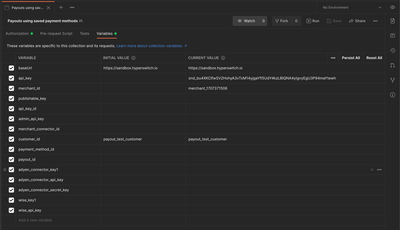 | Variable | Description | Example Value |
| ------------- | ------------------------ | ---------------------------------------------------------- |
| `baseUrl` | API base endpoint | [https://sandbox.pesaswap.io](https://sandbox.pesaswap.io) |
| `merchant_id` | Your merchant identifier | merchant\_12345 |
| `api_key` | Your generated API key | api\_key\_abcd1234 |
**Configuration Steps:**
1. Open the Postman collection
2. Click on the **Variables** tab
3. Enter the values for each required variable
4. Save the configuration
### Step 3: Execute Use Case #1 - Setting Up Payment Methods
Navigate to the **UseCase #1** section in the collection and execute requests in the following order:
1. **Create Customer**
* Establishes a customer record
* Returns a `customer_id` for future reference
2. **Create Payment Method**
* Stores payment method details securely
* Associates payment method with the customer
3. **List Payment Methods**
* Retrieves all saved payment methods for the customer
* Obtains `payment_token` for future transactions
| Variable | Description | Example Value |
| ------------- | ------------------------ | ---------------------------------------------------------- |
| `baseUrl` | API base endpoint | [https://sandbox.pesaswap.io](https://sandbox.pesaswap.io) |
| `merchant_id` | Your merchant identifier | merchant\_12345 |
| `api_key` | Your generated API key | api\_key\_abcd1234 |
**Configuration Steps:**
1. Open the Postman collection
2. Click on the **Variables** tab
3. Enter the values for each required variable
4. Save the configuration
### Step 3: Execute Use Case #1 - Setting Up Payment Methods
Navigate to the **UseCase #1** section in the collection and execute requests in the following order:
1. **Create Customer**
* Establishes a customer record
* Returns a `customer_id` for future reference
2. **Create Payment Method**
* Stores payment method details securely
* Associates payment method with the customer
3. **List Payment Methods**
* Retrieves all saved payment methods for the customer
* Obtains `payment_token` for future transactions
 ### Step 4: Execute Use Case #2 - Processing Payouts
Navigate to the **UseCase #2** section in the collection and execute requests in order:
1. **Create Payout Request**
* Uses the `payment_token` from Step 3
* Initiates the payout transaction
2. **Retrieve Payout Status**
* Monitors the payout transaction status
* Confirms successful completion
## API Workflow Examples
### Creating a Payment Method
```json theme={"system"}
POST /payment_methods
{
"customer_id": "customer_123",
"payment_method": {
"type": "card",
"card": {
"number": "4242424242424242",
"exp_month": 12,
"exp_year": 2025,
"cvc": "123"
}
}
}
```
### Listing Customer Payment Methods
```json theme={"system"}
GET /customers/{customer_id}/payment_methods
```
**Response:**
```json theme={"system"}
{
"payment_methods": [
{
"payment_method_id": "pm_12345",
"payment_token": "token_abcd1234",
"payment_method_type": "card",
"last4": "4242"
}
]
}
```
### Processing a Payout
```json theme={"system"}
POST /payouts
{
"customer_id": "customer_123",
"payment_token": "token_abcd1234",
"amount": 1000,
"currency": "USD",
"description": "Refund for order #12345"
}
```
## Security Considerations
### PCI Compliance
* All payment method details are stored in PCI-compliant infrastructure
* Sensitive data is tokenized and encrypted
* Access is controlled through secure API keys
### Best Practices
* **Token Management:** Store `payment_tokens` securely on your system
* **API Key Security:** Keep API keys confidential and rotate regularly
* **Customer Consent:** Ensure proper customer consent before storing payment methods
* **Data Retention:** Follow appropriate data retention policies
## Troubleshooting
### Common Issues
**Invalid Payment Token**
* Verify the token hasn't expired
* Ensure the customer ID matches the token
**Payout Failures**
* Check processor configuration
* Verify sufficient account balance
* Confirm payment method is valid for payouts
**API Authentication Errors**
* Validate API key is correct and active
* Check merchant ID matches your account
* Ensure proper request headers are set
### Testing Tips
1. **Use Sandbox Environment:** Always test in sandbox before production
2. **Test Different Scenarios:** Try various payment method types and failure cases
3. **Monitor Webhooks:** Set up webhook endpoints to track transaction status
4. **Validate Responses:** Check all API responses for proper data structure
## Next Steps
After successful implementation:
1. **Production Migration:** Switch to production endpoints and credentials
2. **Monitoring Setup:** Implement proper logging and monitoring
3. **Customer Communication:** Set up notification systems for payout status
4. **Compliance Review:** Ensure all processes meet regulatory requirements
## Support Resources
* **Documentation:** Official Pesaswap API documentation
* **Support:** Contact Pesaswap support team for nical assistance
* **Community:** Join the developer community for best practices and tips
### Step 4: Execute Use Case #2 - Processing Payouts
Navigate to the **UseCase #2** section in the collection and execute requests in order:
1. **Create Payout Request**
* Uses the `payment_token` from Step 3
* Initiates the payout transaction
2. **Retrieve Payout Status**
* Monitors the payout transaction status
* Confirms successful completion
## API Workflow Examples
### Creating a Payment Method
```json theme={"system"}
POST /payment_methods
{
"customer_id": "customer_123",
"payment_method": {
"type": "card",
"card": {
"number": "4242424242424242",
"exp_month": 12,
"exp_year": 2025,
"cvc": "123"
}
}
}
```
### Listing Customer Payment Methods
```json theme={"system"}
GET /customers/{customer_id}/payment_methods
```
**Response:**
```json theme={"system"}
{
"payment_methods": [
{
"payment_method_id": "pm_12345",
"payment_token": "token_abcd1234",
"payment_method_type": "card",
"last4": "4242"
}
]
}
```
### Processing a Payout
```json theme={"system"}
POST /payouts
{
"customer_id": "customer_123",
"payment_token": "token_abcd1234",
"amount": 1000,
"currency": "USD",
"description": "Refund for order #12345"
}
```
## Security Considerations
### PCI Compliance
* All payment method details are stored in PCI-compliant infrastructure
* Sensitive data is tokenized and encrypted
* Access is controlled through secure API keys
### Best Practices
* **Token Management:** Store `payment_tokens` securely on your system
* **API Key Security:** Keep API keys confidential and rotate regularly
* **Customer Consent:** Ensure proper customer consent before storing payment methods
* **Data Retention:** Follow appropriate data retention policies
## Troubleshooting
### Common Issues
**Invalid Payment Token**
* Verify the token hasn't expired
* Ensure the customer ID matches the token
**Payout Failures**
* Check processor configuration
* Verify sufficient account balance
* Confirm payment method is valid for payouts
**API Authentication Errors**
* Validate API key is correct and active
* Check merchant ID matches your account
* Ensure proper request headers are set
### Testing Tips
1. **Use Sandbox Environment:** Always test in sandbox before production
2. **Test Different Scenarios:** Try various payment method types and failure cases
3. **Monitor Webhooks:** Set up webhook endpoints to track transaction status
4. **Validate Responses:** Check all API responses for proper data structure
## Next Steps
After successful implementation:
1. **Production Migration:** Switch to production endpoints and credentials
2. **Monitoring Setup:** Implement proper logging and monitoring
3. **Customer Communication:** Set up notification systems for payout status
4. **Compliance Review:** Ensure all processes meet regulatory requirements
## Support Resources
* **Documentation:** Official Pesaswap API documentation
* **Support:** Contact Pesaswap support team for nical assistance
* **Community:** Join the developer community for best practices and tips